EDITOR
FM26 Pre‑Game Editor Tutorial – How to Create Clubs in Football Manager 2026 In this video, I’ll show you how to create a brand‑new club from scratch in the FM26 Pre‑Game Editor. Whether you want to build a custom team, design new kits and colours, create a stadium, or place your club into an existing league, this step‑by‑step guide covers everything you need to know. Perfect for beginners and returning FM players who want full control over their Football Manager 2026 database. 📘 What You’ll Learn - How to create a new club in FM26 - How to set club identity, names, and status - How to edit club colours, kits, and branding - How to create or assign a stadium - How to set finances, budgets, and reputation - How to add players and staff to your new club - How to place your club into an existing league - How to save and load your edited database in Football Manager 2026 📂 Watch the FM26 Editor Series FM26 Editor Playlist → https://www.youtube.com/playlist?list=PLVAih-k0idM6upAwS2BdslHJeHuzl_fZ2 👍 Enjoying the series? Hit Like, Subscribe, and turn on notifications so you don’t miss the next FM26 Editor tutorial. Follow HERE 👇 💙 Twitter - https://twitter.com/DoopaDaddy 💙 Instagram - https://www.instagram.com/doopa_daddy 💙 Facebook - https://www.facebook.com/DoopaDaddyFB #fm26 #footballmanager2026 #fm26editor ⏱️ Timestamps 00:00 Intro 00:35 Adding a Club 04:46 Kits & Colours 07:05 Creating a Stadium 11:53 Finances & Staff 15:30 Add a club into a competition 17:44 In-Game 20:30 Comments

FM26 Editor – How to Create a CLUB
Doopa D
Dive into the world of the football manager 26 pre game editor with this comprehensive fm24 tutorial! 🌟 Learn the essential screens for making edits and which ones you can safely ignore. Whether you're a newbie or looking to enhance your gameplay, these fm26 mods and tips will prepare you for success! 🚀 😎 All my LATEST videos here: https://www.youtube.com/playlist?list=PLVAih-k0idM5Pfn_XCje-th4Zv6nVaHDD Subscribe 👉 @Doopa_D Follow HERE 👇 💙 Twitter - https://twitter.com/DoopaDaddy 💙 Instagram - https://www.instagram.com/doopa_daddy 💙 Facebook - https://www.facebook.com/DoopaDaddyFB #fm26 #footballmanager2026 #fm26editor 00:00 Intro 01:00 Navigating the Editor 02:38 Editing a Player 04:44 Editing a Club 06:27 Saving Your Changes 07:00 Changes In-Game 09:10 Comments

FM26 Editor Beginner Guide — Learn the Basics FAST
Doopa D
FM26 Pre‑Game Editor Tutorial – How to Edit Clubs in Football Manager 2026 In this video, I’ll show you exactly how to edit any club in the FM26 Pre‑Game Editor. Whether you want to change finances, adjust reputation, edit kits and colours, or tweak stadium details, this step‑by‑step guide will walk you through everything safely and clearly. Perfect for beginners and returning FM players looking to customise their Football Manager 2026 experience. 📘 What You’ll Learn - How to safely edit any club in FM26 - How finances and budgets work in the editor - How to change club reputation - How to edit kits, colours, and club identity - How to adjust stadium capacity and details - How to save and load your editor data in Football Manager 2026 😎 All my LATEST videos here: https://www.youtube.com/playlist?list=PLVAih-k0idM5Pfn_XCje-th4Zv6nVaHDD 👍 Enjoying the series? Hit Like, Subscribe, and turn on notifications so you don’t miss the next FM26 Editor tutorial. Subscribe 👉 @Doopa_D Follow HERE 👇 💙 Twitter - https://twitter.com/DoopaDaddy 💙 Instagram - https://www.instagram.com/doopa_daddy 💙 Facebook - https://www.facebook.com/DoopaDaddyFB #fm26 #footballmanager2026 #fm26editor ⏱️ Timestamps 00:00 Intro 00:54 Editing A Club 03:11 Editing Finances 05:38 Editing Kits 07:36 Editing a Stadium 10:00 Saving an Edit 11:52 Comments

FM26 Editor – How to Edit Clubs
Doopa D
😎 All my LATEST videos here: https://www.youtube.com/playlist?list=PLVAih-k0idM5Pfn_XCje-th4Zv6nVaHDD Subscribe 👉 @Doopa_D Follow HERE 👇 💙 Twitter - https://twitter.com/DoopaDaddy 💙 Instagram - https://www.instagram.com/doopa_daddy 💙 Facebook - https://www.facebook.com/DoopaDaddyFB #fm26 #footballmanager2026 #fm26letsplay #fm26tactics
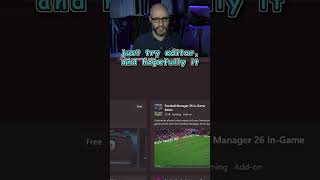
How to get the pre-game FM26 EDITOR for PC GAME PASS #fm26 #shorts
Doopa D
After the feedback on my previous videos testing whether pace is all that matters in FM26 (https://www.youtube.com/watch?v=6fJEOyhALp0&list=PLCLOM2yFG6dkeyo0Hb2tvDJ_iuiX3yQMP) I wanted to rerun the experiment properly. This time the idea is simple: create a full squad with 20 pace and acceleration, and 1 for literally everything else, to remove any doubt about hidden strengths or attribute spread. Problem is, every edited player keeps ending up with high determination, no matter what I do in the editor. It completely undermines the test, because determination will obviously have a big impact on performance and development. Has anyone else run into this when creating players on FM26? Is there a setting I’m missing, or a reliable way to stop the game inflating determination on edited players? The short video shows exactly what I mean, and I’d genuinely appreciate any suggestions or fixes from people who’ve experimented with the editor more than I have. Cheers.

Help! How can I stop created players from having such high determination on FM26?
baz
FM26 Pre‑Game Editor Tutorial – Advanced Rules Part 2: Promotion, Relegation, Playoffs & Prize Money In this video, we continue building your custom competition using Advanced Rules in the FM26 Pre‑Game Editor. Now that your league is playable (from Part 1), it’s time to add the features that make a real football pyramid work: promotion, relegation, playoffs, and prize money. We’ll walk through how to link divisions together, create promotion/relegation paths, build playoff stages, and add financial rewards such as prize money and TV money. These are essential steps for anyone creating a custom league system or a full Build‑a‑Nation project in Football Manager 2026. 📘 What You’ll Learn - How to add promotion and relegation between divisions - How to link divisions inside Advanced Rules - How to create promotion playoffs - How to create relegation playoffs - How to add prize money and TV money - How to structure multi‑stage competitions - How to validate and test your rules - How to build a realistic league system in FM26 📂 Watch the FM26 Editor Series FM26 Editor Playlist → https://www.youtube.com/playlist?list=PLVAih-k0idM6upAwS2BdslHJeHuzl_fZ2 👍 Enjoying the series? Hit Like, Subscribe, and turn on notifications so you don’t miss the next FM26 Editor tutorial. Follow HERE 👇 💙 Twitter - https://twitter.com/DoopaDaddy 💙 Instagram - https://www.instagram.com/doopa_daddy 💙 Facebook - https://www.facebook.com/DoopaDaddyFB #fm26 #footballmanager2026 #fm26editor ⏱️ Timestamps 00:00 Intro 01:45 Adding Relegation & Promotion Rules 07:21 Money Rules 09:34 Save & Verify 12:33 In-Game 14:04 Comments
