FM05-24 3D Kits
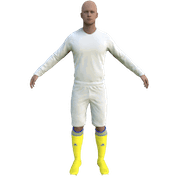
3D Kits are special kits designed to make the match engine look even better, with the players wearing customised and improved kits on the pitch.
These will only work with FM24 and earlier. They will not work with the most latest unity versions from FM26 onwards.
- 686
- 2026.06 - Released on 06 Jun 2026
Download - 25/26 FM05-24 3D Kits
Download - 24/25 FM05-24 3D Kits
Download - 23/24 FM05-24 3D Kits
Download - 22/23 FM05-24 3D Kits
Download - 21/22 FM05-24 3D Kits
Download - 20/21 FM05-24 3D Kits
Download - 19/20 FM05-24 3D Kits
Download - 18/19 FM05-24 3D Kits
If you want to ensure the latest possible version of any kit simply download the megapacks for every game and make sure they're saved in alphanumerical order e.g. in directories called "2020" or "2021". This will ensure you always have have the latest possible kits.
Installation Instructions
Step 1) Where to put Football Manager Graphics
Once you've downloaded a Football Manager Graphic Pack and extracted it you should be left with a single folder on your computer. You're going to need to move that folder into a special location where Football Manager can find it.
Apple: Where to put the FM Graphic Packs on Mac
You will need to copy the folder to this location:
/Users/<yourname>/Library/Application Support/Sports Interactive/Football Manager 2022/graphics
You may find it difficult to find this exact location, to make it easier, use the following instructions:
a) Open Finder
b) Click “Go” from the menubar and select “Go to Folder” (alternatively press Shift+CMD+G)
c) Copy in the following: ~/Library/Application Support/Sports Interactive/
d) Open the “Football Manager 2022” folder
e) Open the “graphics” folder (or created it if it doesn't exist)
f) Move the downloaded files into the ”graphics" folder
Windows: Where to put the FM Graphic Packs on Windows
Simply move the folder to the following location:
Documents/Sports Interactive/Football Manager 2022/graphics
What if I don't have a graphics folder?
If you don't have a “graphics” folder simply create it 🙂
What if the downloaded files ends with .zip, .rar, .7z
If you have a file that ends in .zip, .rar or .7z then you'll need to extract the files before installing them. These files are called “archives” and are a way to compress a folder into a single file for downloading but you'll need to open them and get the folder that's in them before installing. DO NOT put these files in your graphics folder, it won't work.
Extract the files first and then put the extracted files into your graphics folder. If you're not sure how to extract them, look at these guides for windows or for mac.
What if the downloaded files are in parts e.g. “part01.rar”, “part02.rar” etc
If you have downloaded a pack in multiple parts ending in “part01.rar”, “part02.rar” etc then you do not have to extract them all individually. Just extract “part01.rar” and the rest should all be extracted automatically.
Step 2) How to refresh graphics in Football Manager
Unfortunately even though you have the folder in the right place Football Manager won't automatically pick up the new files. You're going to have to go in and tell Football Manager to reload your graphics.
Simply follow these instructions:
a) Open Football Manager
b) Click Preferences on the start screen (or if you're already in a game FM Logo > Preferences)
c) Click the “Advanced” tab
d) On the right hand side select “interface”
e) Scroll down the Skin Heading
f) Uncheck “Use caching to decrease page loading times”
g) Tick “Reload skin when confirming changes to preferences”
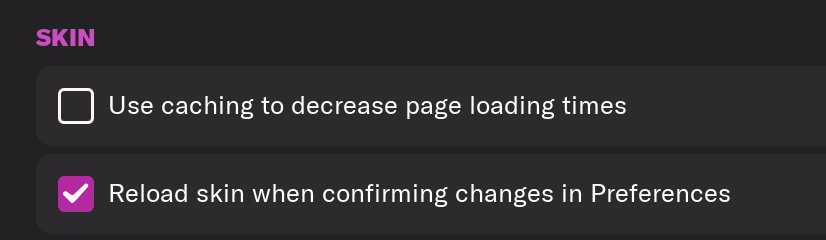
h) Click “Reload Skin”

And now your graphics should be appearing.
You should go back into the preferences and follow the same steps but this time tick “Use caching to decrease page loading times”, this will help with the long term performance of the game, but needed to be unticked to install these graphics.
How to keep megapacks up to date
-
237.93 MiB Download Complete Pack
686 files -
06 Jun 2026 Version 2026.06
686 files (247 changes)
91.68 MiB -
06 Apr 2026 Version 2026.05
439 files (170 changes)
59.01 MiB -
06 Mar 2026 Version 2026.04
269 files (63 changes)
25.12 MiB -
06 Feb 2026 Version 2026.03
206 files (1 changes)
464.24 KiB -
06 Nov 2025 Version 2026.02
206 files (101 changes)
55.12 MiB -
15 Oct 2025 Version 2026.01
105 files (0 changes)
FM05-24 3D Kits Submission Stats
| Nation | Images | Last Updated |
|---|---|---|
 Norway FM05-24 3D Kits
|
45 |
12 Jun 2026 21:37:26 43 new since last megapack |
 Croatia FM05-24 3D Kits
|
37 |
12 Jun 2026 19:59:24 34 new since last megapack |
 Serbia FM05-24 3D Kits
|
88 |
11 Jun 2026 21:59:49 88 new since last megapack |
 Switzerland FM05-24 3D Kits
|
49 | 28 May 2026 21:26:06 |
 Hungary FM05-24 3D Kits
|
31 | 23 May 2026 17:06:21 |
 Sweden FM05-24 3D Kits
|
39 | 23 May 2026 14:13:47 |
 Belarus FM05-24 3D Kits
|
33 | 23 May 2026 13:37:33 |
 Austria FM05-24 3D Kits
|
30 | 23 May 2026 12:11:11 |
 Argentina FM05-24 3D Kits
|
82 | 23 May 2026 10:58:21 |
 England FM05-24 3D Kits
|
438 | 29 Apr 2026 13:16:48 |
 Poland FM05-24 3D Kits
|
254 | 16 Mar 2026 20:41:38 |
 Spain FM05-24 3D Kits
|
155 | 11 Mar 2026 22:01:56 |
 Germany FM05-24 3D Kits
|
245 | 03 Mar 2026 13:44:17 |
 Italy FM05-24 3D Kits
|
62 | 02 Mar 2026 22:40:44 |
 France FM05-24 3D Kits
|
4 | 10 Jan 2026 23:04:25 |
 Mexico FM05-24 3D Kits
|
47 | 29 Dec 2025 17:43:41 |
 Uganda FM05-24 3D Kits
|
2 | 18 Nov 2025 21:53:47 |
 Lithuania FM05-24 3D Kits
|
79 | 18 Nov 2025 21:46:42 |
 India FM05-24 3D Kits
|
9 | 18 Nov 2025 21:42:41 |
 Bhutan FM05-24 3D Kits
|
20 | 18 Nov 2025 21:12:41 |
 Russia FM05-24 3D Kits
|
106 | 01 Nov 2025 20:20:34 |
 Brazil FM05-24 3D Kits
|
59 | 26 Oct 2025 14:02:21 |
 The United States of America FM05-24 3D Kits
|
9 | 18 Sep 2025 02:05:43 |
 Iraq FM05-24 3D Kits
|
10 | 16 Sep 2025 16:46:27 |
 Djibouti FM05-24 3D Kits
|
2 | 12 Sep 2025 13:14:14 |
 Türkiye FM05-24 3D Kits
|
48 | 13 Jun 2025 08:43:56 |
 South Africa FM05-24 3D Kits
|
12 | 29 Nov 2024 00:08:40 |
 Wales FM05-24 3D Kits
|
2 | 24 Nov 2024 22:23:15 |
 El Salvador FM05-24 3D Kits
|
3 | 19 Sep 2024 13:08:38 |
 San Marino FM05-24 3D Kits
|
2 | 02 Aug 2024 15:50:59 |
 Belgium FM05-24 3D Kits
|
9 | 17 Jul 2024 22:02:57 |
 Scotland FM05-24 3D Kits
|
2 | 29 Jun 2024 11:38:03 |
 Saudi Arabia FM05-24 3D Kits
|
2 | 21 Mar 2024 20:04:46 |
 Albania FM05-24 3D Kits
|
25 | 12 Feb 2024 00:35:26 |
 Yemen FM05-24 3D Kits
|
2 | 18 Jan 2024 20:13:47 |
 Canada FM05-24 3D Kits
|
2 | 20 Dec 2023 13:37:49 |
 Indonesia FM05-24 3D Kits
|
4 | 01 Nov 2023 23:10:10 |