FM05-24 3D Kits
3D Kits are special kits designed to make the match engine look even better, with the players wearing customised and improved kits on the pitch.
These will only work with FM24 and earlier. They will not work with the most latest unity versions from FM26 onwards.
- 913
- 2026.07 - Released on 06 Jul 2026
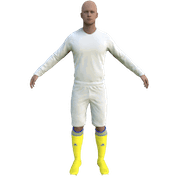

1. Extract folder to Documents/Sport Interactive/Football Manager 20##/graphics/kits/put in here!
( If there is no graphics folder there, create "graphics" )
2. FM14 - click 'Load Game'....click 'FM'...click 'Preferences'...click 'Interface'....click 'Clear Cache'...click tick 'Reload skin when confirming changes' (if you first time)....click 'Reload Skin'
2b. FM15/16 - click 'Preferences'...click 'Interface'....click unticked 'Use caching to decrease page loading times and click tick 'Reload skin when confirming changes in preferences'.....click 'Reload Skin'.
ALWAYS when you download other pack, DO 'CLEAR CACHE then RELOAD SKIN AS ALWAYS after download to folders.
Enjoy
( If there is no graphics folder there, create "graphics" )
2. FM14 - click 'Load Game'....click 'FM'...click 'Preferences'...click 'Interface'....click 'Clear Cache'...click tick 'Reload skin when confirming changes' (if you first time)....click 'Reload Skin'
2b. FM15/16 - click 'Preferences'...click 'Interface'....click unticked 'Use caching to decrease page loading times and click tick 'Reload skin when confirming changes in preferences'.....click 'Reload Skin'.
ALWAYS when you download other pack, DO 'CLEAR CACHE then RELOAD SKIN AS ALWAYS after download to folders.
Enjoy

- Date Created
- 29 Feb 2016 20:43:44
- Date Updated
- 29 Feb 2016 20:43:46
- Last Comment
- 02 Mar 2016 05:56:22
Comments
You'll need to Login to comment
Stustu88
Thank u!
robygn63
Tks