SS' Kits
We have thousands of individual FM Kit Packs, when you download these packs your copy of Football Manager will be updated with all the latest kits. Not only that but you'll have our famous SS Kits, which we think are the best Football Manager Kits around.
- 3,842
- 2026.13 - Released on 06 Jul 2026
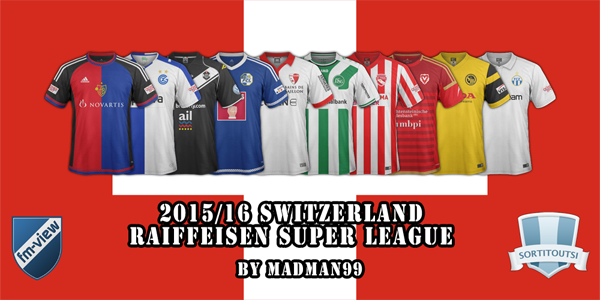
1. Extract folder to Documents/Sport Interactive/Football Manager 20##/graphics/kits/put in here!
( If there is no graphics folder there, create "graphics" )
2. FM14 - click 'Load Game'....click 'FM'...click 'Preferences'...click 'Interface'....click 'Clear Cache'...click tick 'Reload skin when confirming changes' (if you first time)....click 'Reload Skin'
2b. FM15/16 - click 'Preferences'...click 'Interface'....click unticked 'Use caching to decrease page loading times and click tick 'Reload skin when confirming changes in preferences'.....click 'Reload Skin'.
ALWAYS when you download other pack, DO 'CLEAR CACHE then RELOAD SKIN AS ALWAYS after download to folders.
Enjoy
Any problem - please go to this thread - SS Help/Discussion Thread or PM hammer9.
Or if kits not showing or not add third kit..please go to this thread -
Any problem - please go to this thread - SSKCC Thread or PM hammer9.
( If there is no graphics folder there, create "graphics" )
2. FM14 - click 'Load Game'....click 'FM'...click 'Preferences'...click 'Interface'....click 'Clear Cache'...click tick 'Reload skin when confirming changes' (if you first time)....click 'Reload Skin'
2b. FM15/16 - click 'Preferences'...click 'Interface'....click unticked 'Use caching to decrease page loading times and click tick 'Reload skin when confirming changes in preferences'.....click 'Reload Skin'.
ALWAYS when you download other pack, DO 'CLEAR CACHE then RELOAD SKIN AS ALWAYS after download to folders.
Enjoy
Any problem - please go to this thread - SS Help/Discussion Thread or PM hammer9.
Or if kits not showing or not add third kit..please go to this thread -
Any problem - please go to this thread - SSKCC Thread or PM hammer9.

- Date Created
- 14 Feb 2016 21:18:00
- Date Updated
- 14 Feb 2016 21:18:02
- Last Comment
- 02 Apr 2016 07:21:11
Comments
You'll need to Login to comment
jpicanco
wpgpars
Just went to set up Zurich and home doesn't work! Why? Will there be a fix? The config file looks fine.
Cvija