DVX Logos Megapack
High quality Football Manager Logopack
Good quality has been emphasised in the making of DVX Logos for Football Manager. This means that:
- The pack only contains logos of sharp consistent standard that have little to no compression artifacts
- The logos have been processed carefully and have no jagged edges.
- Many logos have been redrawn or heavily retouched to maintain high quality.
Made for High In-Game Zoom
If you use a high level of in-game zoom (utpo 125%), the logopack of choice should contain images in large size. Otherwise logos may look blurry on many screens in game.
- The largest logo images within the DVX pack are 512 px in height, which is twice the FM standard, and much larger than is found in most logopacks.
- Due to the big image size, DVX Logos display an excellent quality with up to 200% in-game zoom.
- 26,046
- 2024.03 - Released on 06 Mar 2025
This file is old and may not be compatible with FM26 and later.
Installation Instructions
Step 1) Where to put Football Manager Graphics
Once you've downloaded a Football Manager Graphic Pack and extracted it you should be left with a single folder on your computer. You're going to need to move that folder into a special location where Football Manager can find it.
Apple: Where to put the FM Graphic Packs on Mac
You will need to copy the folder to this location:
/Users/<yourname>/Library/Application Support/Sports Interactive/Football Manager 2022/graphics
You may find it difficult to find this exact location, to make it easier, use the following instructions:
a) Open Finder
b) Click “Go” from the menubar and select “Go to Folder” (alternatively press Shift+CMD+G)
c) Copy in the following: ~/Library/Application Support/Sports Interactive/
d) Open the “Football Manager 2022” folder
e) Open the “graphics” folder (or created it if it doesn't exist)
f) Move the downloaded files into the ”graphics" folder
Windows: Where to put the FM Graphic Packs on Windows
Simply move the folder to the following location:
Documents/Sports Interactive/Football Manager 2022/graphics
What if I don't have a graphics folder?
If you don't have a “graphics” folder simply create it 🙂
What if the downloaded files ends with .zip, .rar, .7z
If you have a file that ends in .zip, .rar or .7z then you'll need to extract the files before installing them. These files are called “archives” and are a way to compress a folder into a single file for downloading but you'll need to open them and get the folder that's in them before installing. DO NOT put these files in your graphics folder, it won't work.
Extract the files first and then put the extracted files into your graphics folder. If you're not sure how to extract them, look at these guides for windows or for mac.
What if the downloaded files are in parts e.g. “part01.rar”, “part02.rar” etc
If you have downloaded a pack in multiple parts ending in “part01.rar”, “part02.rar” etc then you do not have to extract them all individually. Just extract “part01.rar” and the rest should all be extracted automatically.
Step 2) How to refresh graphics in Football Manager
Unfortunately even though you have the folder in the right place Football Manager won't automatically pick up the new files. You're going to have to go in and tell Football Manager to reload your graphics.
Simply follow these instructions:
a) Open Football Manager
b) Click Preferences on the start screen (or if you're already in a game FM Logo > Preferences)
c) Click the “Advanced” tab
d) On the right hand side select “interface”
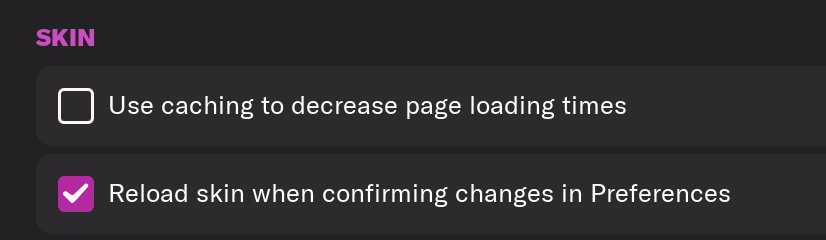
e) Scroll down the Skin Heading
f) Uncheck “Use caching to decrease page loading times”
g) Tick “Reload skin when confirming changes to preferences”
h) Click “Reload Skin”
And now your graphics should be appearing.
You should go back into the preferences and follow the same steps but this time tick “Use caching to decrease page loading times”, this will help with the long term performance of the game, but needed to be unticked to install these graphics.
You'll need to Login to comment
fm_usa
Hi guys, does anyone have Man Utds small logo by any chance? thank you
Spybus09
Hi mates! I was wondering if it's easy for you to add some greek media logos. I found the logos to help you, but I don't know the IDs. Tnx in advance!
ducc
Hi Spybus09. I have not yet properly gone through the media sources in FM24, but with a cursory look it seems there are no Greek media in the official SI DB. Logos that do not have, or have not had, an ID in the game, will not be added to the pack. That being said, I can make the logos for you in DVX style, so you can add them into the game in case the media sources are in a custom DB.
Svartowiz
I still use this pack for FM24. Do you have any ETA on the updated 24 version?
Thanks for all your amazing work.
ducc
Thanks @Svartowiz.
The new pack is still work in progress, but I'm trying to complete it by the end of the month - or very early December at the latest.
Cizzu
Thanks!
ducc
Its not quite Christmas yet, but the new version of the pack for FM24 is now up. More information and download link in the first post.
fm_usa
Hi can anyone do this swiss flag in small please?
AlexPUK2002
Any chance anyone could do the Nottingham Forest Logo in white please in all sizes? I have added it here but its hard to see as the image is white and its on a white background
1seasonwonder
hi guys does anyone have Uniteds small logo?
ducc
24v2 update is available for download with over 500 new, improved or updated logos. Link in the first post.
Wiremu
Anyone have the united files?
981
https://drive.google.com/drive/folders/15aaivgQw9JkwhG7EJrC5YjNJxpDWze1h?usp=sharing
manu logos
AlexPUK2002
Can anyone create the Japan logo in all sizes? I have attached it here, which is the logo which is used on the shirts.
marchino78
hey @ducc hope you are well. Are you planning a new update for your logos?
ducc
Still kicking.
I'm working on an update, but it has been postponed until FM25 is released.
AlexPUK2002
Hi @ducc I know you are waiting until FM25 is released to release your updated logo pack, but I was wondering if you could send me the updated Yeovil Town logo?
ducc
Hi @AlexPUK2002
The new Yeovil Town logo should be in "clubs/alternative" folder if you have installed the 24v2 update. 👍
HJN030
@ducc Although Football Manager 25 has been canceled, it would still be great if an update for your fantastic logo pack is released. I hope you are still planning to publish an update?
1seasonwonder
hi guys, do you have the small logo for san diego fc please?
ducc
Dammit SI, can you not sort it out…
I will be releasing an update to DVX24.
@1seasonwonder I sent you a PM.
zumraw
Hey @ducc, is there a chance to have the Man Utd logo with the next update? I know why it was not initially included and I'm using the alternative that is provided in the pack, but maybe the original can be added now?
ducc
@zumraw I sent you a PM.
ducc
Update 24v3 is available for download with over 2700 new, improved or updated logos. This batch was supposed to be the nucleus of refreshed content for DVX25 logopack, but as there will be no FM25, I made it into an update to the previous pack.
24v2 must be installed before installing 24v3.
Link in the first post.
Will Thomas
love the work guys, could i request the attached images - dont have ID's as doing an older database - if any of these have already been done please let me know (also sorry for so many)
ducc
@Will Thomas I sent you a PM.
Vadenok
нет ссылки для скачивания
UnitedStag8
English forum,please post in English in the future please.
Download link in there in plain sight!!
Vadenok
Sorry! my friend I know how to download, there is no mirror on the latest patch from March 6
23GERE10
@ducc Hello, is there no free mirror to download the latest update? A mediafire link shows up on the previous one, but there is nothing under the March update.