Steel Logos Megapack
- 93,067
- 2026.08 - Released on 05 Jul 2026
Installation Instructions
Step 1) Where to put Football Manager Graphics
Once you've downloaded a Football Manager Graphic Pack and extracted it you should be left with a single folder on your computer. You're going to need to move that folder into a special location where Football Manager can find it.
Apple: Where to put the FM Graphic Packs on Mac
You will need to copy the folder to this location:
/Users/<yourname>/Library/Application Support/Sports Interactive/Football Manager 2022/graphics
You may find it difficult to find this exact location, to make it easier, use the following instructions:
a) Open Finder
b) Click “Go” from the menubar and select “Go to Folder” (alternatively press Shift+CMD+G)
c) Copy in the following: ~/Library/Application Support/Sports Interactive/
d) Open the “Football Manager 2022” folder
e) Open the “graphics” folder (or created it if it doesn't exist)
f) Move the downloaded files into the ”graphics" folder
Windows: Where to put the FM Graphic Packs on Windows
Simply move the folder to the following location:
Documents/Sports Interactive/Football Manager 2022/graphics
What if I don't have a graphics folder?
If you don't have a “graphics” folder simply create it 🙂
What if the downloaded files ends with .zip, .rar, .7z
If you have a file that ends in .zip, .rar or .7z then you'll need to extract the files before installing them. These files are called “archives” and are a way to compress a folder into a single file for downloading but you'll need to open them and get the folder that's in them before installing. DO NOT put these files in your graphics folder, it won't work.
Extract the files first and then put the extracted files into your graphics folder. If you're not sure how to extract them, look at these guides for windows or for mac.
What if the downloaded files are in parts e.g. “part01.rar”, “part02.rar” etc
If you have downloaded a pack in multiple parts ending in “part01.rar”, “part02.rar” etc then you do not have to extract them all individually. Just extract “part01.rar” and the rest should all be extracted automatically.
Step 2) How to refresh graphics in Football Manager
Unfortunately even though you have the folder in the right place Football Manager won't automatically pick up the new files. You're going to have to go in and tell Football Manager to reload your graphics.
Simply follow these instructions:
a) Open Football Manager
b) Click Preferences on the start screen (or if you're already in a game FM Logo > Preferences)
c) Click the “Advanced” tab
d) On the right hand side select “interface”
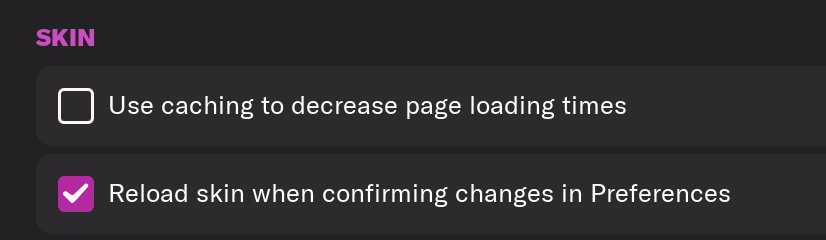
e) Scroll down the Skin Heading
f) Uncheck “Use caching to decrease page loading times”
g) Tick “Reload skin when confirming changes to preferences”
h) Click “Reload Skin”
And now your graphics should be appearing.
You should go back into the preferences and follow the same steps but this time tick “Use caching to decrease page loading times”, this will help with the long term performance of the game, but needed to be unticked to install these graphics.
You'll need to Login to comment
vonHolzminden
Thanks again for the update today. I love your logos.
JULIANO RIBEIRO MICHELATO
Hi there,
I noticed an issue with the logo for Associação Portuguesa de Desportos (Portuguesa de São Paulo), a Brazilian club, after installing the logo pack.
The team has an incorrect logo assigned in the game. The correct team ID is 1929, and I’ve attached the correct logo to this message for replacement.
Thanks in advance for your great work and attention to this!
Derek
Sorry mate but when I check the pack this logo is used for the ID 333 which seems correct. The ID 1929 is for Bangor City and the correct logo is used for both teams.
JULIANO RIBEIRO MICHELATO
Sorry for the confusion, mate – you're absolutely right about the ID, my mistake on that part. Thanks for pointing it out!
However, in my game, the logo showing up for that ID is the one in the image I attached. Just wanted to flag it in case it helps identify any issue or mismatch that might be happening on my end.
Appreciate your help!
vonHolzminden
Do you mean that in the next update the bug with logos in fm26 will be solved? Id´s and so on? Not all logos are showing.
Derek
All ten packs we make at FMG are already updated, tested and work perfectly in-game mate. If you are having issues with yours it's possible you downloaded the pack before I updated it.
I updated all packs on FMG on the 2nd and 3rd of November while I believe they were added here yesterday.
SafwanShafee
Dear Derek,
I am a big fan of Steel Logo and for every FM (Football Manager) release, i'm keep using your logos for my game. I have never encountered any issues with the logos before. However, a problem has appeared since i updated the change file for version 2026.01. Many of the club logos are not displaying. Is this a bug, or did i miss a setting?
I have attached a couple of screenshot for your reference and attention.
Thank you for your time.
Derek
All is working fine with the megapack and update. All are tested before release.
Please post a picture of the contents of your clubs ‘normal’ folder. Also please explain how you updated the pack.
This way I can help you fix the issue.
SafwanShafee
I have removed the 'Steel Logo' pack. After that, I downloaded the 'FMG Logos Megapack', but the issue persist. The club logos same from my previous screenshots are still not working. When on Megapack Version 2026.00, all the logos were showing up perfectly. However, immediately after updating to the Update Version 2026.01, all the custom club logos are now missing or have reverted to the defaults. I have checked my graphics folder, and the logo pack is still installed. Can you help me to fix this Derek? Do I need to re-install the logo pack or something else?
Here the step i downloaded the logo and installed it ;
1. Downloaded 'FMG Logo Megapack' Version 2026.0.
2. Extracted the files.
3. Moved the all files from 'FMG Logos Megapack' into users/documents/sportsinteractive/footballmanager26/graphic/logo.
4. After that, i've downloaded the update pack version 2026.01.
5. Extracted, moved the files update pack version 2026.01, replaces the files in the destination and click “Yes”, into the same 'logo' folder mentioned above.
Here the attachment of the picture from “normal" folder
SafwanShafee
I have removed the 'Steel Logo' pack. After that, I downloaded the 'FMG Logos Megapack', but the issue persist. The club logos same from my previous screenshots are still not working. When on FMG Logo Megapack Version 2026.00, all the logos were showing up perfectly. However, immediately after updating to the FMG Logo Update Version 2026.01, all the custom club logos are now missing or have reverted to the defaults. I have checked my graphics folder, and the logo pack is still installed.
Here the step i downloaded the logo and installed it ;
1. Downloaded FMG Logo Megapack version 2026.00
2. Extracted the files.
3. Moved the all files from 'FMG Logos Megapack' into users/documents/sportsinteractive/footballmanager26/graphic/logos
4. After that, i downloaded the update pack version 2026.01.
5. Extracted, moved the files update pack version 2026.01, when the message show, replaces the files in the destination and i'm click “Yes” on it, into the same 'logos' folder mentioned above.
Right now, I'm only playing with the FMG Logo Megapack version 2026.00. I haven't applied the update pack version 2026.01 because if I use the 2026.01, the logos for the other clubs all revert to the default ones.
Can you help me to fix this Derek? Do I need to re-install the logo pack or something else?
Here the attachment of the picture from location of my logo folder and contents of “normal" folder
Derek
I think the issue stems from an earlier issue where I had reuploaded all the megapacks on FMG on November 2nd/3rd with a fix for FM26. It took sometime for those packs to be updated here as I've mentioned in this thread and others on Sortitoutsi.
It looks as though you have downloaded a pre-fix version of the pack. Please download the megapack and update from the links below and it will work fine.
FM26 FMG Logos Megapack 2026.00
https://footballmanagergraphics.com/files/file/945-fmg-logos-megapack-202600/
FM26 FMG Logos Update 2026.01
https://footballmanagergraphics.com/files/file/945-fmg-logos-megapack-202600/
or
FM26 FMG Steel Logos Megapack 2026.00
https://footballmanagergraphics.com/files/file/949-fmg-steel-logos-megapack-202600/
FM26 FMG Steel Update Logos 2026.01
https://footballmanagergraphics.com/files/file/992-fm26-fmg-steel-logos-202601/
SafwanShafee
It works Derek!
Thank you!
Derek
No problem 🙂
gb2003
I love your logo pack. I installed the logo pack since some years and for me one of the best logo packs out there.
Do you take request for teams? Salford City has maybe in the future a new logo.
It's is possible to get a steel logo for the new future logo?
https://www.salfordcityfc.co.uk/news/2025/november/28/salford-city-proposes-new-club-crest-to-supporters/
Derek
Sorry I don't visit here often but this logo is included in the new update. Feel free to message us at FMG if you need anything.
https://footballmanagergraphics.com/files/file/1021-fm26-fmg-steel-logos-202602/
reecebcfc
Hello. Can we expect any retro Bristol City FC logos? Thanks!
gb2003
No problem. Thank you for the update! I appreciate your work.