TCM Logos Megapack
The TCM Logos Megapack is a huge logopack containing thousands of logos.
Created by http://www.tcmlogos.com/
- 76,802
- 2026.02 - Released on 05 Jul 2026
Installation Instructions
Step 1) Where to put Football Manager Graphics
Once you've downloaded a Football Manager Graphic Pack and extracted it you should be left with a single folder on your computer. You're going to need to move that folder into a special location where Football Manager can find it.
Apple: Where to put the FM Graphic Packs on Mac
You will need to copy the folder to this location:
/Users/<yourname>/Library/Application Support/Sports Interactive/Football Manager 2022/graphics
You may find it difficult to find this exact location, to make it easier, use the following instructions:
a) Open Finder
b) Click “Go” from the menubar and select “Go to Folder” (alternatively press Shift+CMD+G)
c) Copy in the following: ~/Library/Application Support/Sports Interactive/
d) Open the “Football Manager 2022” folder
e) Open the “graphics” folder (or created it if it doesn't exist)
f) Move the downloaded files into the ”graphics" folder
Windows: Where to put the FM Graphic Packs on Windows
Simply move the folder to the following location:
Documents/Sports Interactive/Football Manager 2022/graphics
What if I don't have a graphics folder?
If you don't have a “graphics” folder simply create it 🙂
What if the downloaded files ends with .zip, .rar, .7z
If you have a file that ends in .zip, .rar or .7z then you'll need to extract the files before installing them. These files are called “archives” and are a way to compress a folder into a single file for downloading but you'll need to open them and get the folder that's in them before installing. DO NOT put these files in your graphics folder, it won't work.
Extract the files first and then put the extracted files into your graphics folder. If you're not sure how to extract them, look at these guides for windows or for mac.
What if the downloaded files are in parts e.g. “part01.rar”, “part02.rar” etc
If you have downloaded a pack in multiple parts ending in “part01.rar”, “part02.rar” etc then you do not have to extract them all individually. Just extract “part01.rar” and the rest should all be extracted automatically.
Step 2) How to refresh graphics in Football Manager
Unfortunately even though you have the folder in the right place Football Manager won't automatically pick up the new files. You're going to have to go in and tell Football Manager to reload your graphics.
Simply follow these instructions:
a) Open Football Manager
b) Click Preferences on the start screen (or if you're already in a game FM Logo > Preferences)
c) Click the “Advanced” tab
d) On the right hand side select “interface”
e) Scroll down the Skin Heading
f) Uncheck “Use caching to decrease page loading times”
g) Tick “Reload skin when confirming changes to preferences”
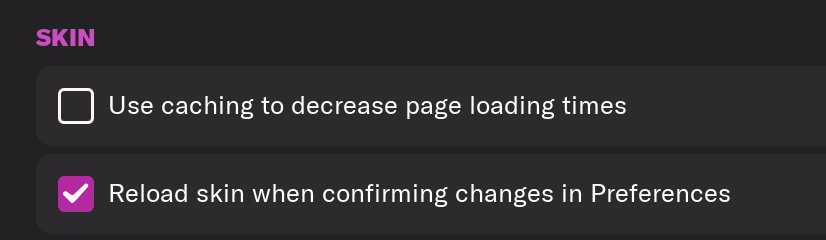
h) Click “Reload Skin”
And now your graphics should be appearing.
You should go back into the preferences and follow the same steps but this time tick “Use caching to decrease page loading times”, this will help with the long term performance of the game, but needed to be unticked to install these graphics.
Frequently Asked Questions
Copy all folders and files from the folder "Megapack TCM18" to the following path: Documents/Sports Interactive/Football Manager.
In the game, go to Preferences and then in Interface
In the part Appearance, untag the box "Use caching to decrease page loading times" and tag the box "Reload skin when confirming changes in Preferences"
Confirm changes and the Logos will appear.
You'll need to Login to comment
pires120013
non avec cette update: https://steamcommunity.com/sharedfiles/filedetails/?id=3220285092
Script1ner
For some reason I downloaded the updates and now all of a sudden I can’t see my champions league logo or europa League
Kinmar
You must install the megapack before installing the update and follow the instructions on the official website. Otherwise, please put a screenshot of the installation folders.
ndrshn
I cannot extract megapack by neither 7-zip nor winrar. Extracting is getting freeze at 25%.
giggsxbr
Any plan for the next update, such as Liverpool's new logo? Thanks
Kinmar
https://x.com/tcmlogos/status/1844468278787441046
Latrell yard man
I would like the new Ajax logo.
Kinmar
For the next FM25 pack (not for the next FM24 Update)
Latrell yard man
Ok thank you mate.
Nilsss1989
I'm looking for someone who can help me add the Manchester United badge/logo in FM24, I've tried everything but nothing works 😢
im using the TCM logopack
DWCallaghan
Will Ladies clubs be added at any point ? or a new logo pack perhaps ?
Kinmar
Yes, a new pack is planned for around November 4th and it will include the female logos and will be completed gradually with updates.
DWCallaghan
Thanks
pezzahawkins
Great work with new pack for FM26!
Question, in previous years there has been both federation logos and nation flags, so the players had the nation flag in their profile, with the team have federation logo. Is this no longer possible with FM26?
Thanks in advance!
Pez
pezzahawkins
Great work with new pack for FM26!
Question, in previous years there has been both federation logos and nation flags, so the players had the nation flag in their profile, with the team have federation logo. Is this no longer possible with FM26?
Thanks in advance!
Pez
DWCallaghan
Any update on female logos ?
Kinmar
So I didn't include the flags (I couldn't get them to work), but I did manage to get the federation logos working (with a workaround for the image format). However, if you prefer the flags, you just need to delete the Federations folder.
Kinmar
All playable women's clubs are included in the new pack (I haven't had time to update it on partner sites like this one yet). So check the official website to download TCM26 😉
pezzahawkins
Thanks!
Yeah, I know I could delete this but then i'd lose all logos and ONLY see flags. I guess I was wanting the best of both worlds haha. Thanks again!
WilliamRS
Buonasera, ho scaricato tcmlogos2026.00 l'ho messo nella cartella grafica (che ho creato) in footbal manager 26.
Qual'è il percorso per attivarlo???
mi date istruzioni passo passo, grazie.
Kinmar
There's no activation required. Just remember to extract the files, but if that doesn't work, simply quit and restart the game. I've added the installation instructions to the first post.
Kinmar
There's no activation required. Just remember to extract the files, but if that doesn't work, simply quit and restart the game. I've added the installation instructions to the first post.
Puma5
ho installato FMG Standard logos 2026 ma non mi inserisce il logo della Serie A nel gioco?
Kinmar
This thread is about TCM logos or non-FMG. I suggest you look in the correct thread. But with TCM, this issue no longer arises.
Onur Tufan
Hi, for TCM, if I download “Complete Pack 2026.00”, do I need to do anything else to see missing Serie A, Napoli and Real Madrid logos? (It seems it is a general problem for all logo packs, is this pack vulnerable for the same or is it fixed in that pack?)
Thanks!
Kinmar
There are no issues with this pack. The logos will display correctly.
Onur Tufan
It worked without previous issues, thanks.
flcinusa
Scottish competition horribly out of date, still listing Cinch leagues and Viaplay cup
Kinmar
I'm doing my best to update as many of the 75,000 logos as possible. I can't see them all, and I'm counting on the community to share information with me via email or the website's request section. I hadn't received this information, so it will be corrected with other Scottish competitions.
serkantunali
Hi. Malezya kuala Lumpur City FC New logo please 200X200 40X40 20X20