DVX Logos Megapack
High quality Football Manager Logopack
Good quality has been emphasised in the making of DVX Logos for Football Manager. This means that:
- The pack only contains logos of sharp consistent standard that have little to no compression artifacts
- The logos have been processed carefully and have no jagged edges.
- Many logos have been redrawn or heavily retouched to maintain high quality.
Made for High In-Game Zoom
If you use a high level of in-game zoom (utpo 125%), the logopack of choice should contain images in large size. Otherwise logos may look blurry on many screens in game.
- The largest logo images within the DVX pack are 512 px in height, which is twice the FM standard, and much larger than is found in most logopacks.
- Due to the big image size, DVX Logos display an excellent quality with up to 200% in-game zoom.
- 26,046
- 2024.03 - Released on 06 Mar 2025
This file is old and may not be compatible with FM26 and later.
Installation Instructions
Step 1) Where to put Football Manager Graphics
Once you've downloaded a Football Manager Graphic Pack and extracted it you should be left with a single folder on your computer. You're going to need to move that folder into a special location where Football Manager can find it.
Apple: Where to put the FM Graphic Packs on Mac
You will need to copy the folder to this location:
/Users/<yourname>/Library/Application Support/Sports Interactive/Football Manager 2022/graphics
You may find it difficult to find this exact location, to make it easier, use the following instructions:
a) Open Finder
b) Click “Go” from the menubar and select “Go to Folder” (alternatively press Shift+CMD+G)
c) Copy in the following: ~/Library/Application Support/Sports Interactive/
d) Open the “Football Manager 2022” folder
e) Open the “graphics” folder (or created it if it doesn't exist)
f) Move the downloaded files into the ”graphics" folder
Windows: Where to put the FM Graphic Packs on Windows
Simply move the folder to the following location:
Documents/Sports Interactive/Football Manager 2022/graphics
What if I don't have a graphics folder?
If you don't have a “graphics” folder simply create it 🙂
What if the downloaded files ends with .zip, .rar, .7z
If you have a file that ends in .zip, .rar or .7z then you'll need to extract the files before installing them. These files are called “archives” and are a way to compress a folder into a single file for downloading but you'll need to open them and get the folder that's in them before installing. DO NOT put these files in your graphics folder, it won't work.
Extract the files first and then put the extracted files into your graphics folder. If you're not sure how to extract them, look at these guides for windows or for mac.
What if the downloaded files are in parts e.g. “part01.rar”, “part02.rar” etc
If you have downloaded a pack in multiple parts ending in “part01.rar”, “part02.rar” etc then you do not have to extract them all individually. Just extract “part01.rar” and the rest should all be extracted automatically.
Step 2) How to refresh graphics in Football Manager
Unfortunately even though you have the folder in the right place Football Manager won't automatically pick up the new files. You're going to have to go in and tell Football Manager to reload your graphics.
Simply follow these instructions:
a) Open Football Manager
b) Click Preferences on the start screen (or if you're already in a game FM Logo > Preferences)
c) Click the “Advanced” tab
d) On the right hand side select “interface”
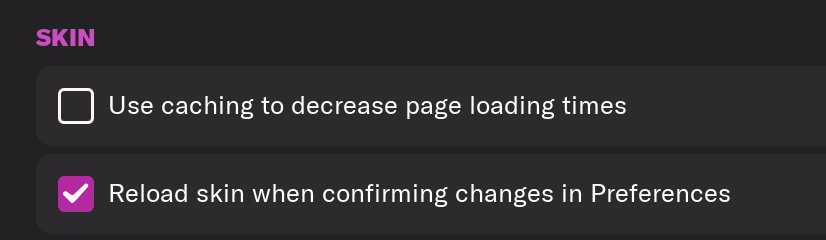
e) Scroll down the Skin Heading
f) Uncheck “Use caching to decrease page loading times”
g) Tick “Reload skin when confirming changes to preferences”
h) Click “Reload Skin”
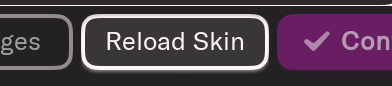
And now your graphics should be appearing.
You should go back into the preferences and follow the same steps but this time tick “Use caching to decrease page loading times”, this will help with the long term performance of the game, but needed to be unticked to install these graphics.
You'll need to Login to comment
ducc
Did you try the link that is in the first post? It is working for me, but do tell if there is a problem. Here is the 24v3 download link.
ducc
Sorry I didn't notice your post. The link in the first post should work. Here it is again.
1seasonwonder
hi guys does anyone have the small ncaa or us colleges logo by any chance? thank you
ducc
Its in the pack in all sizes as club logo 981817_concacaf_usa.
AnimeBatman
Really nice pack, just wanted to check which teams/logos are missing? I can see I'll have to find a Manchester United one from elsewhere but wanted to make sure I hadn't missed any others?
ducc
@AnimeBatman You can send me a PM if you want the Man Utd logo. The pack should have logos of all the other reputable clubs and then some, but let me know if an important logo is missing.
AnimeBatman
@ducc Thanks for the reply, I actually can't PM as I haven't been active here enough😅 It's no worries though, I was able to make an image and icon myself with the same resolution as your pack, I really only wanted to check whether I needed any more logos as I am in the process of getting FM24 set-up for the first time.
Thanks again!
Timeless One
would it be possible to send it to me too?
renato.
Hello, @ducc, news for FM26?
ducc
There will be a pack for FM26. It seems FM26, the Beta at least, has some peculiarities that affect how graphics can be displayed. I'm trying to learn how things work…
w44643233
The current issue is that in the graphics folder, the same file name cannot appear. If the same file name does appear, only one of them will be effective.
I have always used your Logos because your file name is not a simple numeric ID, so it won't conflict with the faces file. It seems that among all the Logos styles now, only your one is perfectly compatible. There should be no problem, right?
ducc
The pack should work fine in the Beta with small alterations. Rename the folder “associations” to something like “xassociations”, so that it is alphabetically the last folder within the DVX24 folder. If you want to use alternative logos, rename the “alternative” folders to for example “xalternative”, so that they come alphabetically after the “primary” folders.
If you have several graphics packs in your graphics folder, they may be sensitive to the order in which they appear. You can try to change their names and see if it makes a difference. Quit and exit the game between name changes.
w44643233
I noticed that the folder order priority of FM26 seems to be Z-A? It seems that those starting with "Z" are of the highest priority.
Quite a few teams have updated their logos. I wonder if you have any plans for an update?
ducc
I'm working on an update.
AlexPUK2002
Will you be making a FM24 version of the update as well as an FM26, for those of us that will be sticking with FM24?
ducc
This is not something I have been planning to do, but I could release the small logos, required by FM24, as a separate download.
ducc
hh
AlexPUK2002
That would be great if you could. I have seen a lot of people maybe sticking with FM24 so hopefully this will be a good option for those staying with it
marchino78
Looking forward for your pack … your logos are always the best one. Would you include those already in the game or would you leave out EPL and those fully licensed?
ducc
The complication will be that the folder structure is different in the new game compared to the earlier versions.
Thanks mate. I will add as many logos as possible, licensed or not, with the emphasis on the leagues that are playable in the out-of-the-box game.
coywen
Is there any latest news? Looking forward to
ducc
I'm working on it, but its taking a little bit longer than I thought it would.
AlexPUK2002
How is the progress going with creating the new logos?
If it is at all possible, are you able to share the photoshop action file that you use to create the logos so I can create some and add them to the pack that is available?