TCM Logos Megapack
The TCM Logos Megapack is a huge logopack containing thousands of logos.
Created by http://www.tcmlogos.com/
- 76,802
- 2026.02 - Released on 05 Jul 2026
Installation Instructions
Step 1) Where to put Football Manager Graphics
Once you've downloaded a Football Manager Graphic Pack and extracted it you should be left with a single folder on your computer. You're going to need to move that folder into a special location where Football Manager can find it.
Apple: Where to put the FM Graphic Packs on Mac
You will need to copy the folder to this location:
/Users/<yourname>/Library/Application Support/Sports Interactive/Football Manager 2022/graphics
You may find it difficult to find this exact location, to make it easier, use the following instructions:
a) Open Finder
b) Click “Go” from the menubar and select “Go to Folder” (alternatively press Shift+CMD+G)
c) Copy in the following: ~/Library/Application Support/Sports Interactive/
d) Open the “Football Manager 2022” folder
e) Open the “graphics” folder (or created it if it doesn't exist)
f) Move the downloaded files into the ”graphics" folder
Windows: Where to put the FM Graphic Packs on Windows
Simply move the folder to the following location:
Documents/Sports Interactive/Football Manager 2022/graphics
What if I don't have a graphics folder?
If you don't have a “graphics” folder simply create it 🙂
What if the downloaded files ends with .zip, .rar, .7z
If you have a file that ends in .zip, .rar or .7z then you'll need to extract the files before installing them. These files are called “archives” and are a way to compress a folder into a single file for downloading but you'll need to open them and get the folder that's in them before installing. DO NOT put these files in your graphics folder, it won't work.
Extract the files first and then put the extracted files into your graphics folder. If you're not sure how to extract them, look at these guides for windows or for mac.
What if the downloaded files are in parts e.g. “part01.rar”, “part02.rar” etc
If you have downloaded a pack in multiple parts ending in “part01.rar”, “part02.rar” etc then you do not have to extract them all individually. Just extract “part01.rar” and the rest should all be extracted automatically.
Step 2) How to refresh graphics in Football Manager
Unfortunately even though you have the folder in the right place Football Manager won't automatically pick up the new files. You're going to have to go in and tell Football Manager to reload your graphics.
Simply follow these instructions:
a) Open Football Manager
b) Click Preferences on the start screen (or if you're already in a game FM Logo > Preferences)
c) Click the “Advanced” tab
d) On the right hand side select “interface”
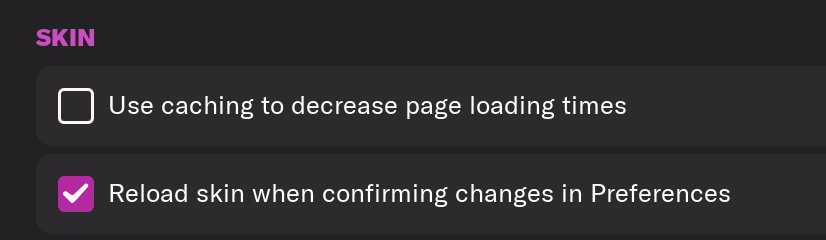
e) Scroll down the Skin Heading
f) Uncheck “Use caching to decrease page loading times”
g) Tick “Reload skin when confirming changes to preferences”
h) Click “Reload Skin”
And now your graphics should be appearing.
You should go back into the preferences and follow the same steps but this time tick “Use caching to decrease page loading times”, this will help with the long term performance of the game, but needed to be unticked to install these graphics.
Frequently Asked Questions
Copy all folders and files from the folder "Megapack TCM18" to the following path: Documents/Sports Interactive/Football Manager.
In the game, go to Preferences and then in Interface
In the part Appearance, untag the box "Use caching to decrease page loading times" and tag the box "Reload skin when confirming changes in Preferences"
Confirm changes and the Logos will appear.
You'll need to Login to comment
serkantunali
Bulgaria liga Arda 100. Years logo please
Kinmar
I now only offer 400x400px if possible and this will be in the next update, I do not respond to individual requests.
mikaaa72
Hello, does this new logo pack work with FM24 too? Thanks for helping!
Kinmar
Hello. Not entirely.
Since the pack only contains one image per club/competition, the "small" version that was in the older FM versions isn't included. Therefore, the standard logo will work, but those that display in "small" format (historical rankings, etc.) won't.
Unfortunately, I don't have time to release an update for FM24, but the TCM24 logos are still available for free on the TCM website.
manabu501
Hi,I downloaded TCMLogos and placed it in the graphics folder, but club logos like Real Madrid and Inter are not showing up. I've also downloaded the Real Name Fix. Do you have any idea what might be causing this?
Kinmar
No idea (you definitely need to have downloaded the TCM26 package).
Screenshots of the installation folders would be helpful.
manabu501
"Thank you for your reply. As attached, I’ve placed it inside the graphics."
Kinmar
Looking at it this way, no problem. Everything else I see is working correctly? Perhaps there are conflicts with the other files present.
manabu501
Actually, the others aren't working properly either. The face pack isn't functioning for some, like Inter and Real Madrid.
Kinmar
Update 16.1 : 2606 Logos : 2163 Clubs, 442 Competitions, 1 Federation, including 814 women's logos
Total Megapack with Update : 76,430 logos
https://www.tcmlogos.com/tcm26-logos-fm26/
gb2003
Thank you @Kinmar . I asked for the new Salford City Logo and you done it.
Really appreciated.
Keep up the good work!
Shallong
Hi @Kinmar ,
The logo of Chinese club Tianjin Jinmen Tiger (UID: 416) is incorrect in TCM26, but it's correct in TCM24, please change it.
THX!
Kinmar
Hi. Yes, I don't know why I changed the logo... It will be fixed! Thanks for pointing it out.
Adam Chandler
Hi there, wondering if you can help.
I currently use your logo pack. since the recent update logo's are missing from the dressing room above the lockers and from the premier league board when teams are lining up.
I uninstalled and reinstalled the game, that didnt do anything. so i removed the logo pack….and the logos came back as they are licensed teams. Im Coventry City, and then the premier league team logos are there.
I put the logo pack back into the graphics folder and the logos in the dressing room and premier league line up have gone again and are just generic logos.
The logo pack works fine throughout the rest of the game when going through the UI.
i know its just a little thing, but its just annoyed me because everything was ok until the most recent update
Qvordrup
This is a bug in the game after the most recent update patch.
Adam Chandler
Ah ok. so its an everybody thing then.
Thank you for a quick response.
Kinmar
https://x.com/i/status/2032494962101887392
Ronaldinho JR
Why with this mode i have this problem (without i have normal logos)
Kinmar
Look ⤴️
V4MCJ-Br
First of all, thank you and congratulations on the incredible work.
The logos for the Brazilian championships are outdated. Would it be possible to update them?
If so, I can do the research and send you the new logos.
@Kinmar
Kinmar
Thank you for the compliments.
Indeed, my last update was at Christmas, so the championship logos that started in January and have since changed are not included.
Please feel free to visit the TCMlogos website and go to the Requests section, and it will be taken into account for the next update (for which I don't yet have a date to provide...).
Tronec_93_
Marseille and Wolfsburg new logo
Kinmar
Thank you, already planned (but without the star and the text for Marseille following an X/Twitter poll)
Tronec_93_
yes , star and text is very specific . but for me is better than clear logo .
any fan recreate new logo and look fantastic . did you see it ?
Giuseppe Regina
Sorry, when will you update the logos? You haven't done it since January. They're nice, but the other logos are updated every month.
Kinmar
coywen
Did the author forget to update?
Kinmar
I haven't had time to check all the partner and community sites yet, but update 26.2 is indeed available on the TCMLogos website.
Kinmar
Update 26.2 is live !
The latest update for the TCM26 Logopack is now available on the TCMLogos website!
Upgrade your FM26 experience with 676 new logos (men's football) added to the game.
Thank you to all the contributors :
aeightBee, Alexandre, Futbolas France, Julkjulk, Koennerd, Loukas, Marcos, MZ17, ocad, olokoporfutebol, Pires120013, Rakan, Rolle, Vince-Taiwan & Kinmar.
leMoustique
Hey,
I really love the logo pack, thanks for your great work! I just wanted to say that FC Písek has a new crisp logo - you can check their page!
Best regards
Julius