TCM Logos Megapack
The TCM Logos Megapack is a huge logopack containing thousands of logos.
Created by http://www.tcmlogos.com/
- 76,802
- 2026.02 - Released on 05 Jul 2026
Installation Instructions
Step 1) Where to put Football Manager Graphics
Once you've downloaded a Football Manager Graphic Pack and extracted it you should be left with a single folder on your computer. You're going to need to move that folder into a special location where Football Manager can find it.
Apple: Where to put the FM Graphic Packs on Mac
You will need to copy the folder to this location:
/Users/<yourname>/Library/Application Support/Sports Interactive/Football Manager 2022/graphics
You may find it difficult to find this exact location, to make it easier, use the following instructions:
a) Open Finder
b) Click “Go” from the menubar and select “Go to Folder” (alternatively press Shift+CMD+G)
c) Copy in the following: ~/Library/Application Support/Sports Interactive/
d) Open the “Football Manager 2022” folder
e) Open the “graphics” folder (or created it if it doesn't exist)
f) Move the downloaded files into the ”graphics" folder
Windows: Where to put the FM Graphic Packs on Windows
Simply move the folder to the following location:
Documents/Sports Interactive/Football Manager 2022/graphics
What if I don't have a graphics folder?
If you don't have a “graphics” folder simply create it 🙂
What if the downloaded files ends with .zip, .rar, .7z
If you have a file that ends in .zip, .rar or .7z then you'll need to extract the files before installing them. These files are called “archives” and are a way to compress a folder into a single file for downloading but you'll need to open them and get the folder that's in them before installing. DO NOT put these files in your graphics folder, it won't work.
Extract the files first and then put the extracted files into your graphics folder. If you're not sure how to extract them, look at these guides for windows or for mac.
What if the downloaded files are in parts e.g. “part01.rar”, “part02.rar” etc
If you have downloaded a pack in multiple parts ending in “part01.rar”, “part02.rar” etc then you do not have to extract them all individually. Just extract “part01.rar” and the rest should all be extracted automatically.
Step 2) How to refresh graphics in Football Manager
Unfortunately even though you have the folder in the right place Football Manager won't automatically pick up the new files. You're going to have to go in and tell Football Manager to reload your graphics.
Simply follow these instructions:
a) Open Football Manager
b) Click Preferences on the start screen (or if you're already in a game FM Logo > Preferences)
c) Click the “Advanced” tab
d) On the right hand side select “interface”
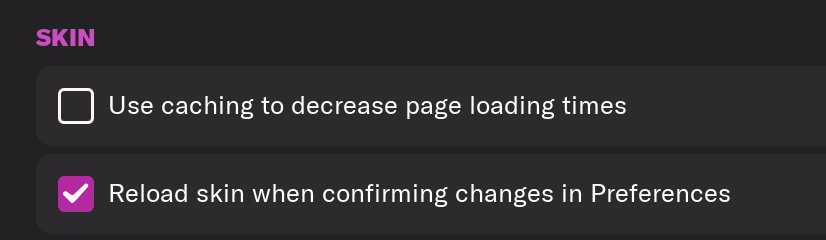
e) Scroll down the Skin Heading
f) Uncheck “Use caching to decrease page loading times”
g) Tick “Reload skin when confirming changes to preferences”
h) Click “Reload Skin”
And now your graphics should be appearing.
You should go back into the preferences and follow the same steps but this time tick “Use caching to decrease page loading times”, this will help with the long term performance of the game, but needed to be unticked to install these graphics.
Frequently Asked Questions
Copy all folders and files from the folder "Megapack TCM18" to the following path: Documents/Sports Interactive/Football Manager.
In the game, go to Preferences and then in Interface
In the part Appearance, untag the box "Use caching to decrease page loading times" and tag the box "Reload skin when confirming changes in Preferences"
Confirm changes and the Logos will appear.
You'll need to Login to comment
Kinmar
Download the TCM26 Logopack, Megapack of 75.000 clubs and competitions logos for Football Manager 26!
This is the 12th edition of the TCM Logos Megapack for Football Manager.
After more than 6 Millions downloads between 2014 and 2025, we want to offer more!
Adopt the brilliant TCM26 Logo megapack for Football Manager 26 by TCMLogos.com.
Download HERE
MEGAPACK :232 Nations : 68638 Clubs + 5873 Competitions + 246 Miscellaneous = 74757 LOGOS
MENS : 68073 Clubs + 5801 Competitions + 246 Miscellaneous = 74120 LOGOS
Africa : 3647 Clubs + 234 Competitions
North America : 4173 Clubs + 352 Competitions
South America : 5645 Clubs + 310 Competitions
Asia: 7476 Clubs + 923 Competitions
Europa : 46575 Clubs + 3624 Competitions
Oceania : 624 Clubs + 93 Competitions
WOMENS : 565 Clubs + 72 Competitions = 637 LOGOS
+ Confederations, Federations, International Competitions.
Logos present in standard format (200px or 400px)
Installing TCM26 Megapack:
– Unzip the downloaded file with a unzipping tool like 7zip or WinRar.
– Copy the «Logos TCM26» folder
– Paste to the following path (create the «graphics» folder if necessary) :
Windows : \Documents\Sports Interactive\Football Manager 26\graphics
MAC : Users\NAME\Library\Application Support\Sports Interactive\Football Manager 26\graphics
– Quit the game and restart it if it’s already open. Logos will appear.
If you have logos to make, two possibilities:
- If there are only a few logos, go to page requests: https://www.tcmlogos.com/requetes-request/
- If there is a lot of logos or if you want to become a contributor, go to contributor page : https://www.tcmlogos.com/tcm-contributor/
Screenshot TCM26 English in FM26 (click to enlarge) :
Greetings :
Developers :
Contributors : TCM26 :9rezer, Alain, Alieks, Armamaddon, Enzu, Eray1914, Ianvou, JohnTheTall, Julkjulk, Junkas, Loukas, Lucas, Marcodoglio94, Marcos Marín Martín, MisterJacob, MZ17, Oriole, Pires120013, Rcc24, Thomas B., Vince-Taiwan, Vitami.
Old TCM : Adam.Kn Ahmed, Alex.C, Alfredo, Alon, AndreaLAZIOultras, Anoniem13, ArturM, Ashley.H, BaCplayer, Barry, Basa, bdavies26, Borell, Brendan, Broeren, Bussinhoke, cdmafra, Chavez, ChristoLEC, claytonpadula, Cleuber, Diogo Paiva, Doki, Domi, Dylan, Einherjer83, Ekrem, Elcatracho, Franzvinci01, Frimimout, Fronti, Gamma022, George, Gfchaza09, Giovy37, Heval, Hrvoje, Humez, Jacob, Jayden, JesperBN, Jonah_222, Julian, Kamil, Kartvel, Koen.W, Koennerd, Kostas_Panachaiki, Kristo, Loic, MaartoV, Maestro, Mahdi (Mój Football Manager), Makiawelli_leg, Marcos, MatheusMux, MrBankzy, mrsmiis, Necjeff (DF11 Faces), Nikolay, Ningxi, Nuno Santos, nxtfuture, Pappeldrache, Patres10 (FMSlovakia – FC12 Kits), Patrick, Paul_13, Pazzoman, Pedro, PedroMPB, Pierre-Jean, Rafael, Ramoscu (FMTurkiye), RBRND, Rebecca Carson, Rein, Renato, Rivanov, Rmorgan93, Rob, SBK, SebDiex, Segmann, Sh@rk, Skeila, Spartacus23, Spix22, Stathis, Steinbolt, STeRODeF, Talal Alsharah, Tapioca, Theodor (@e_spurs_norway), Thewes, Torbin, Tuckius, Unknown47, Uros, V-Toll, Walleski, Weiry, Wutzwz.
Warnings :
This creation (TCM26) is a property of the site TCMLogos.com and is in free use for personal use only. The only authorized download links are the official links available on the site to monitor the downloads statistics. If you wish to integrate our creation into a presentation, your own graphics, for any public use, thanks for asking us the permission. TCMLogos.com is a non profit website and only wishes to help the Football Manager players community. However, some recognition isn’t much asking for a time wasting work. Therefore, thanks for respecting these few rules.
Additional Information :
https:/www.tcmlogos.com/ (Website link)
[email protected] (Website email)
https:/www.facebook.com/tcmlogos (Facebook)
https:/twitter.com/tcmlogos (Twitter)
http://steamcommunity.com/groups/tcm-fm (Steam)
coywen
http://www.the-aiff.com
Kinmar
Do you prefer this logo or this logo?
Cymro
On a side note, if there is an ID wrong for a logo in the pack how do we get in touch to say?
Kinmar
On the presentation message, there are links in case of request, with a form to complete. If necessary, a contact by email is also possible.
I'm also waiting for Footygamer to update the links and redirect from the download page to this page and not the TCM19 ^^ page (and remove the Mega link)
I do not know if you have the rights
Kinmar
Download the first update for TCM20 Logos with 4035 new & update logos.
47000 logos available ! 🎅
Lewar
Kinmar
Hi. For Man Utd logo, you can read here the reason :
https://www.fmscout.com/a-the-future-of-fm-graphic-packs.html
and
https://www.twitlonger.com/show/n_1sr2d7c
Look your Private message
Sukiru
Kinmar
Look message before and check private message
FredtheFRed
Naitsab
leinmou2012
cebul
Kinmar
Je ne comprends pas ta requête. L'équipe Jong Ajax par exemple reprends automatiquement le logo de l'équipe première (la U19 aussi) ce qui fait qu'un seul logo pour l'équipe première suffit. Je viens de vérifier et le logo s'affiche partout peu importe l'équipe de l'Ajax choisie. De plus, l'ID du club Jong Ajax n'apparait pas dans la liste d'équipe que ce soit sur l'éditeur ou via des logiciels externes, ce qui rends compliqué d'ajouter un logo à chaque fois, obligeant de voir manuellement chaque équipe première pour connaitre l'ID de l'équipe B.
Si tu vois qu'il y a un soucis là dessus, n'hésite pas à m'expliquer, avec des screenshot s'il faut.
And Sorry for french, cebul speak french, it's more esay for me
R189
Chris Nielsen
Hey Kinmar
Is it still possible to get hands on the Man Utd Logos?
AIJB91
Tuckius
Can tou request the new ones here please? https://www.tcmlogos.com/requetes-request/
AIJB91
Done! Larne, Eastbourne Borough and Hampton & Richmond all submitted. Thanks for your efforts!
The fixer
kamil18AFC
SolC
Kinmar
On the next Update in few days
Kinmar
Download the last update for TCM20 Logos with 11024 new & update logos.
More than 57600 logos available !
Cymro
Top work as usual. Just downloaded it and the logo is not there. Any chance of uploading it?
EDIT: Just found it, wrong Club ID. Logo is registered under old club ID.
Kinmar
Dalian, ID : 407 ? It's on the update
Cymro
Just amended my post above your response.
Just got to download the first update again to hopefully get the original logo.
Kinmar
Cymro
Yes, old ID: 23325085