FM05-24 3D Kits
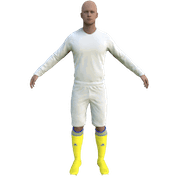
3D Kits are special kits designed to make the match engine look even better, with the players wearing customised and improved kits on the pitch.
These will only work with FM24 and earlier. They will not work with the most latest unity versions from FM26 onwards.
- 913
- 2026.07 - Released on 06 Jul 2026
Step 1) Where to put Football Manager Graphics
Once you've downloaded a Football Manager Graphic Pack and extracted it you should be left with a single folder on your computer. You're going to need to move that folder into a special location where Football Manager can find it.
Apple: Where to put the FM Graphic Packs on Mac
You will need to copy the folder to this location:
/Users/<yourname>/Library/Application Support/Sports Interactive/Football Manager 2024/graphics
You may find it difficult to find this exact location, to make it easier, use the following instructions:
a) Open Finder
b) Click “Go” from the menubar and select “Go to Folder” (alternatively press Shift+CMD+G)
c) Copy in the following: ~/Library/Application Support/Sports Interactive/
d) Open the “Football Manager 2024” folder
e) Open the “graphics” folder (or created it if it doesn't exist)
f) Move the downloaded files into the ”graphics" folder
Windows: Where to put the FM Graphic Packs on Windows
Simply move the folder to the following location:
Documents/Sports Interactive/Football Manager 2024/graphics
What if I don't have a graphics folder?
If you don't have a “graphics” folder simply create it 🙂
The downloaded files ends with .zip, .rar, .7z
If you have a file that ends in .zip, .rar or .7z then you'll need to extract the files before installing them. These files are called “archives” and are a way to compress a folder into a single file for downloading but you'll need to open them and get the folder that's in them before installing. DO NOT put these files in your graphics folder, it won't work.
Extract the files first and then put the extracted files into your graphics folder. If you're not sure how to extract them, look at these guides for windows or for mac.
Step 2) How to refresh graphics in Football Manager
Unfortunately even though you have the folder in the right place Football Manager won't automatically pick up the new files. You're going to have to go in and tell Football Manager to reload your graphics.
Simply follow these instructions:
a) Open Football Manager
b) Click Preferences on the start screen (or if you're already in a game FM Logo > Preferences)
c) Click the “Advanced” tab
d) On the right hand side select “interface”
e) Scroll down the Skin Heading
f) Uncheck “Use caching to decrease page loading times”
g) Tick “Reload skin when confirming changes to preferences”
Comments
You'll need to Login to comment
totof78
Bonjour et merci pour ce travail et le partage , tu arrête la ou tu continu vers National 2 ?
Chrissy10970
Merci beaucoup.
SirOliv
National 2 avec 4 groupes de 14, y en a pour un moment 😂
Mais on verra si je suis motivé…
National 2 with 4 groups of 14 teams, it will be for a while. Maybe I will do it…
totof78
pas d'inquiétude je comprend que cela représente du travail et du temps
Styg
Merci pour le pack, super boulot !
Chrissy10970
Bonjour,
Le troisième maillot de Sochaux est en fait celui du gardien.
SirOliv
Ok thx
FifiMinus
Please do it for national 1 FM 26
merci beaucoup d'avance !
Schaefferantoni
Bonjour ,
il y aurais les maillot de national pour Fm 26 Svpl?
merci à vous