FM05-24 3D Kits
3D Kits are special kits designed to make the match engine look even better, with the players wearing customised and improved kits on the pitch.
These will only work with FM24 and earlier. They will not work with the most latest unity versions from FM26 onwards.
- 913
- 2026.07 - Released on 06 Jul 2026
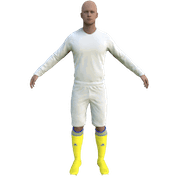
1. Extract folder to Documents/Sport Interactive/Football Manager 20##/graphics/kits/put in here!
( If there is no graphics folder there, create "graphics" )
2. FMXX - click 'Preferences' > 'Interface' > unticked 'Use caching to decrease page loading times & tick 'Reload skin when confirming changes' > click 'Reload Skin' for first your time.
THEN ALWAYS when you download other packs, DO Click 'Preferences'>'Interface'>'CLEAR CACHE then again click 'RELOAD SKIN' AS ALWAYS after downloading to folders.
Enjoy 🙂

- Date Created
- 11 Oct 2024 23:17:34
- Date Updated
- 13 Oct 2024 14:51:01
- Last Comment
- 26 May 2025 18:49:50
Comments
You'll need to Login to comment
Fwied
Thanks
erentkgn44
Hi, I am creating standard kits with the “3D to 2D Photoshop script”, a defect appears as in the ss. So the kits are not created properly. The same problem occurs with your France ligue 1 files. What is the reason for this?
Cedinero
No idea, might be your script.
Use this instead: https://fmkitcreator.com/tools/minikit-generator/
erentkgn44
I don't think it is related to the script because I have never had any problems with other files. But thank you for the link you gave, I was able to create the kits without any problems.
StuartNG
The kits are sized wrong pal. They need to be 1024 x 1024.
Re-sized for you to give you a leg-up.
roman23123
I did everything correctly, but it won’t install.
roman23123
The kits for the 23-24 season in Serie A were by default; I did not install them myself.
Latrell yard man
i do not know why but this is not working.
roman23123
+
Roach33
Same… i have all your kits installed but these doesnt work 😢
hammer9
Italy - Serie A 3D'24-25 Relink! (13/10/24)
(updated - fixed config error)
Roach33
Thanks! problem solved! 🙂
hammer9
yeah, i fixed the config and then tested them it's working. glad to help 🙂
roman23123
Thanks, it worked, but everyone has white numbers on their backs
roman23123
Thanks, it worked, but everyone has white numbers on their backs
Latrell yard man
Thanks @hammer9
hammer9
i dont know how to do with this numbers, ask @mons or @Fidney 👍
Fidney
Changing the 2D or 3D kits does not change the colours of the numbers.
For 23/24 the Juventus kit had a large black panel on the back with white numbers, which you can see for the players on the bar at the bottom in your screenshot.
For 24/25 they switched it round so it had a large white panel with black numbers - you have updated the 3D kit to the 24/25 one, but the colour of the numbers remains the correct colour for the 23/24 season.
You need to change the colour of the numbers using the editor. You can definitely do that in the pre-game editor. I am not sure if you can do it in the in-game editor as I do not have that.
I hope this helps.
Breakdown Enterprises
SERIA B pls
3.30YTRA杜鹏
Will I be able to install in FM23?
Gianko
Good evening,
i would like to have Avellino
Please help me!
Doom2nd
Atalanta´s 3rd kit doesn´t work in game.It´s all red here, instead of yellow
MrIn0x
i've always had kits that worked but since the last update milan and the inter no longer work in 3d.
they only work on the club and other pages
MrIn0x
MrIn0x
ImProbablyGonnaExplode
COMO not working for me either - is it FM coding?
ImProbablyGonnaExplode
Correction - it works in matches but not in the changing room loading screen home page
hammer9
Doom2nd
MrIn0x
this is 3D Italy Serie A….your pictures of SS kits here but should go with this one - https://sortitoutsi.net/content/67131/italy-serie-a-ss2425-new-061024
표성식
Napoli have no third kit
Dendy Ferdhiansyah
please, still doesnt work at me 😢