@Mrunal Kurale, we want the player's face to fill the canvas for the 250px cutout, which would mean cropping the image along these red lines:
At the same time, we want all cuts to include a little bit of collar. Since in some sources like this one, the person in the image may have a longer neck than usual, this would be quite difficult to achieve naturally.
Here's a video of the process on how to nudge the collar upwards:
@Mrunal Kurale, we want the player's face to fill the canvas for the 250px cutout, which would mean cropping the image along these red lines:
At the same time, we want all cuts to include a little bit of collar. Since in some sources like this one, the person in the image may have a longer neck than usual, this would be quite difficult to achieve naturally.
Here's a video of the process on how to nudge the collar upwards:
Hey @mons is it the same issue why all of the submitted images were rejected. From what I understood, is that image has a lot of collar exposed than what is required/needed and also face size needs to be a bit bigger, am I correct?
Hey @mons is it the same issue why all of the submitted images were rejected. From what I understood, is that image has a lot of collar exposed than what is required/needed and also face size needs to be a bit bigger, am I correct?
The 250x250 canvas for the cut shouldn't go more than 2-3 pixels beneath the chin and above the head, nudging the collar if need be. Have a look at other cuts in the submission forum for a guide on what we're aiming for.
Also, since you're still starting out, I suggest that you have a good look at the tutorial and guidelines thread. I would also suggest that you post the source images and draft cut in there for now, for our feedback 👍
The 250x250 canvas for the cut shouldn't go more than 2-3 pixels beneath the chin and above the head, nudging the collar if need be. Have a look at other cuts in the submission forum for a guide on what we're aiming for.
Also, since you're still starting out, I suggest that you have a good look at the tutorial and guidelines thread. I would also suggest that you post the source images and draft cut in there for now, for our feedback 👍
Hey @mons tried the process as mentioned in the video. while nudging the collar, the neck area and collar area sometimes don't look continuous. I Have also uploaded the Source images for you, to be able to improve on the game ready images.
Hey @mons tried the process as mentioned in the video. while nudging the collar, the neck area and collar area sometimes don't look continuous. I Have also uploaded the Source images for you, to be able to improve on the game ready images.
Good work, but you don't need to nudge the collar quite so far upwards. This post may help explain it in a simpler manner 👍

 Background and Stadium Packs



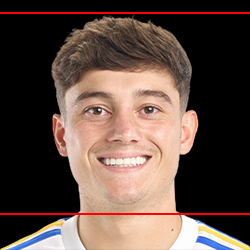


@Mrunal Kurale, we want the player's face to fill the canvas for the 250px cutout, which would mean cropping the image along these red lines:
At the same time, we want all cuts to include a little bit of collar. Since in some sources like this one, the person in the image may have a longer neck than usual, this would be quite difficult to achieve naturally.
Here's a video of the process on how to nudge the collar upwards: