


Subscribe to this thread (by following these steps) so you get notifications whenever a new version is released.
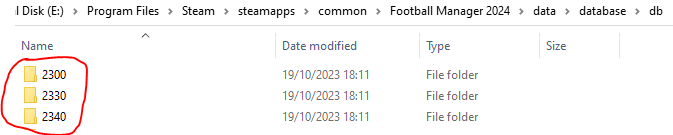
If you are playing an FM23 save in FM24, then this fix needs to be also installed in the below folders:
If you have any issues, first read the FAQ.
This file will need to be re-applied if/when official patches/updates are released to ensure full compatibility. This is due to the fact that some files which are removed when installing this file are automatically re-installed by Steam when official patches come out.
Some of these changes, ESPECIALLY THE CLUB NAMES, do NOT apply in existing save-games. There's a workaround for that in the first post.
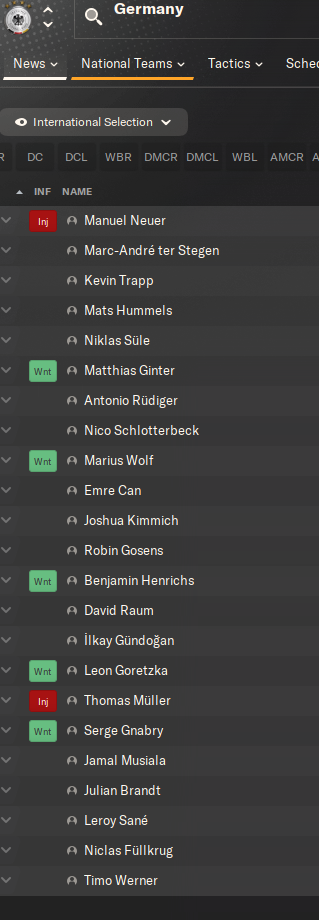
The sortitoutsi real names fix changes the instances of fake names in Football Manager 2024 to the proper, real life names for awards, cities, stadiums and competitions, in cases where the actual name is not licensed, such as Premier League displaying instead of Premier Division. It will also fix the fact that the German National team doesn't call up real players. These fixes are all fully save-game compatible.
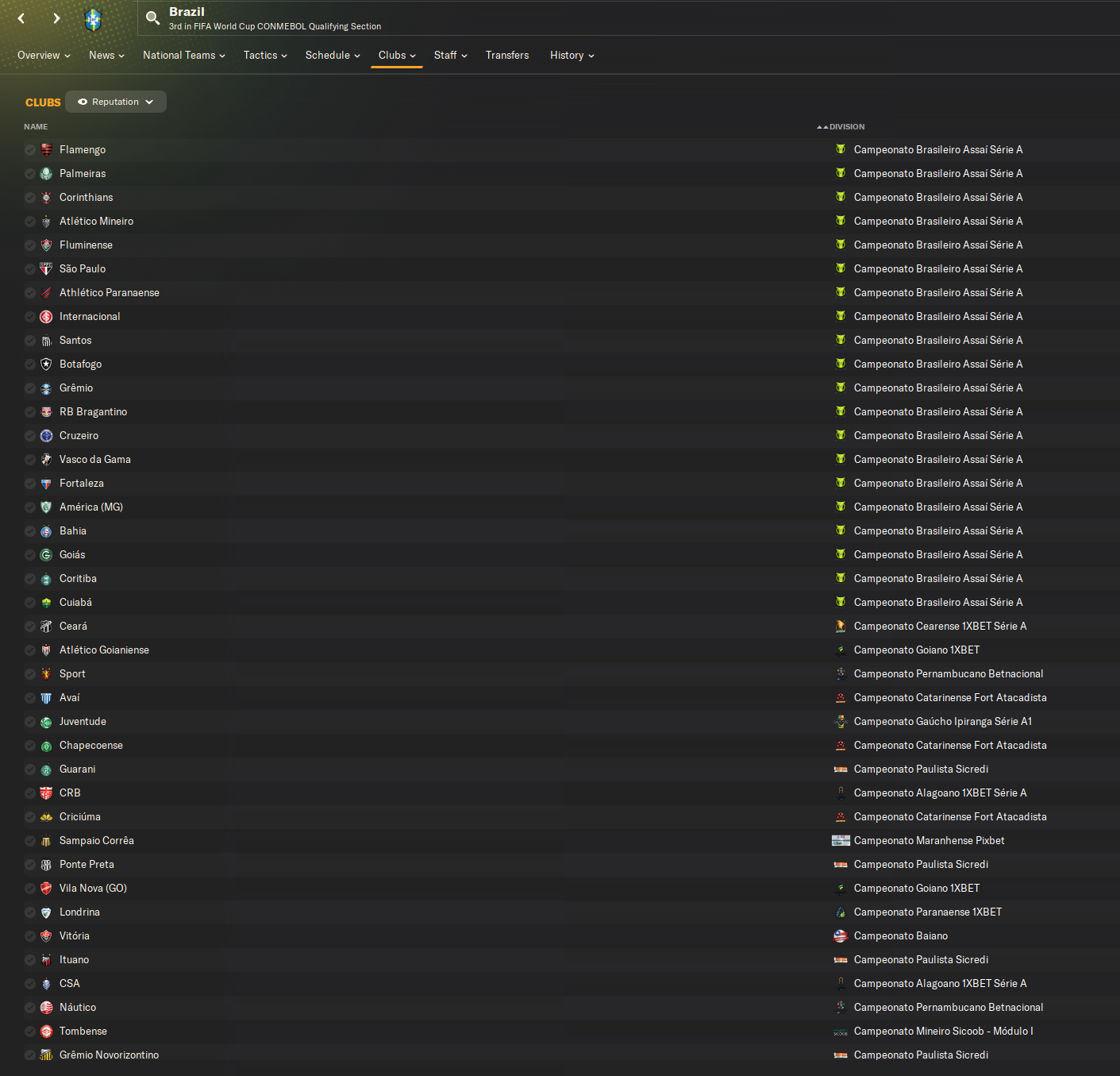
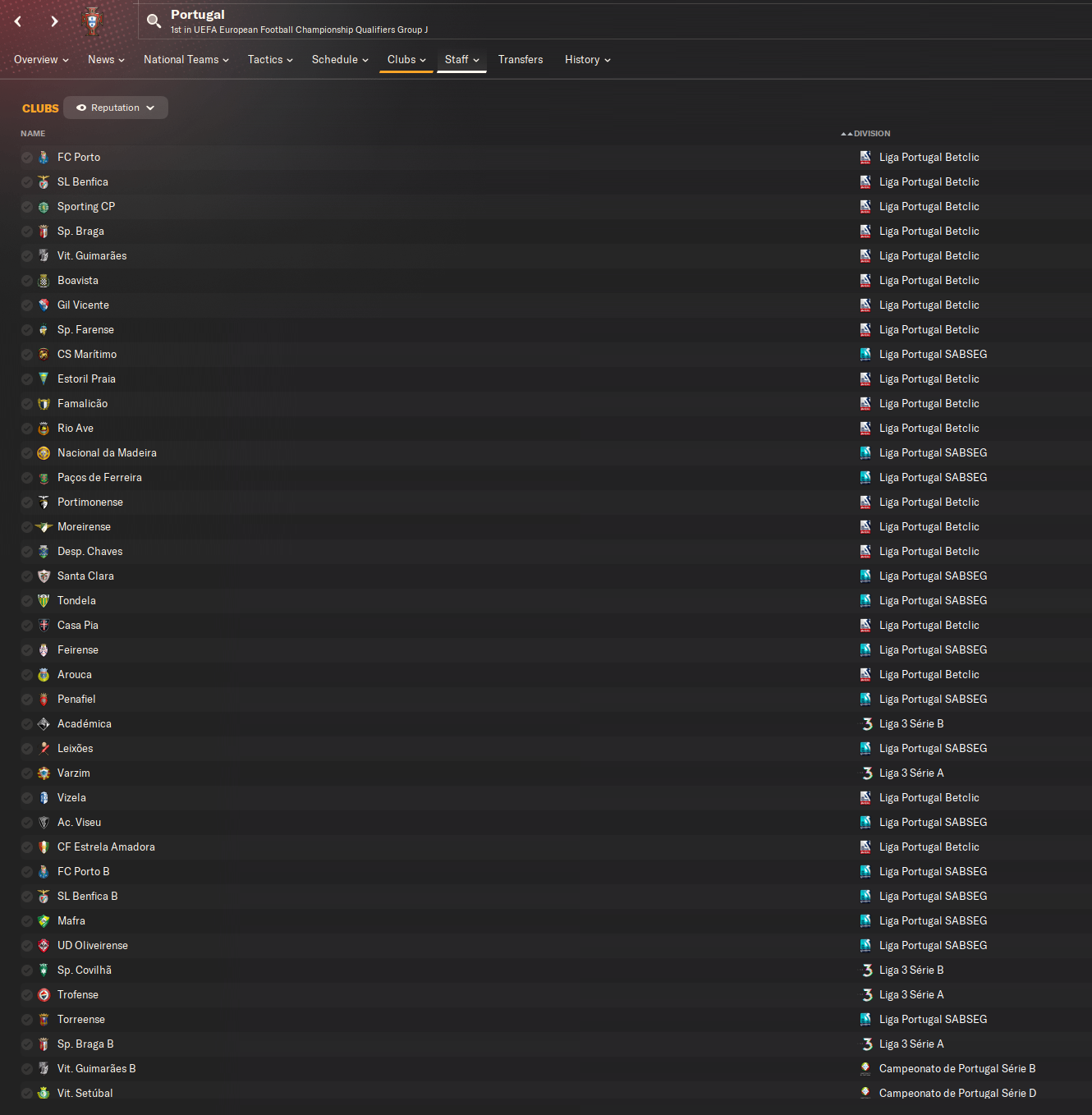
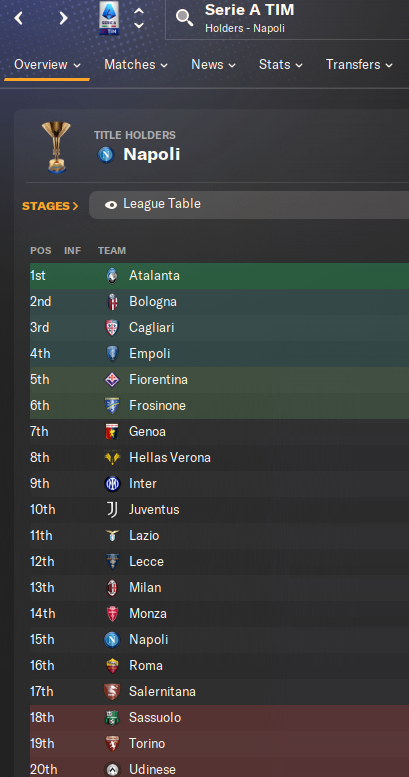
There is also a club name changes file, which changes the names of clubs in a way which ensures that any nicknames entered in the default database are retained. This file includes the proper names for Brazilian, German, Spanish, Portuguese, Italian (including Napoli) and French clubs, as well as Manchester Utd, to circumvent licensing restrictions. It also adds real-life media and journalists, encompassing most major footballing nations and continents. Brazilian clubs' text colours are also changed through an editor data file. Another editor data file creates the Ajax non-playing staff missing from the database due to licensing restrictions. Finally, it includes a small file which corrects the 3-Letter competition names to correspond with any changes made in the lnc files. For all the files in this paragraph to work, however, you will need to start a new game.
Follow the below instructions to install this version of this file
STEP 1.
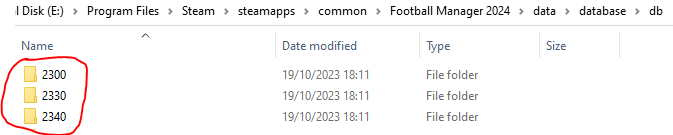
If you are playing an FM23 save in FM24, then this fix needs to be also installed in the folders in the below image IN ADDITION TO THOSE INDICATED BELOW the image:
OPEN
Program Files (x86)\Steam\SteamApps\common\Football Manager 2024\data\database\db\2400
DELETE only the dbc , edt and lnc folders
OPEN
Program Files (x86)\Steam\SteamApps\common\Football Manager 2024\data\database\db\2430
DELETE only the dbc , edt and lnc folders
Notes: \Program Files (x86)\ could be \Program Files\ depending on your set up.
Equivalent folders for PC players on Gamepass
PC players on Gamepass
I am led to understand that mods are enabled by default this year, so nothing needs to be done other than the below
OPEN
Xboxgames\Football Manager 2024\data\database\db\2400
DELETE only the dbc , edt and lnc folders
OPEN
Xboxgames\Football Manager 2024\data\database\db\2430
DELETE only the dbc , edt and lnc folders
Equivalent folders for PC players on Epic Games
Epic Games Installation
OPEN
Program Files (x86)\Epic Games\FootballManager2024\data\database\db\2400
DELETE only the dbc , edt and lnc folders
OPEN
Program Files (x86)\Epic Games\FootballManager2024\data\database\db\2430
DELETE only the dbc , edt and lnc folders
Notes: \Program Files (x86)\ could be \Program Files\ depending on your set up.
Equivalent folders for Mac users
Mac installation
OPEN
/ Users / username / Library / Application Support / Steam / steamapps / common / Football Manager 2024 / data / database / db / 2400
DELETE only the dbc , edt and lnc folders
OPEN
/ Users / username / Library / Application Support / Steam / steamapps / common / Football Manager 2024 / data / database / db / 2430
DELETE only the dbc , edt and lnc folders
The easiest way to get to these folders is by going to Finder > Go > Go to Folder and copy and paste these exact paths and you will be taken to the right places ~/Library/Application Support/Steam/steamapps/common/Football Manager 2024/data/database/db/2400/
Alternatively you can get to the Library folder by simply selecting Go from the top bar and holding "alt" key - The Library folder suddenly appears on the drop down menu
For Mac Lion users, the Library folder will be hidden. Use this link to find out how to show it.
For those struggling to find the Steam and Steam Apps folder etc using Mac with the new OS High Sierra, this link below shows how you can unhide your Library folder which will then let you find the other folders.
Equivalent folders for Mac players on Epic Games
Epic Games Installation
OPEN
MAC HD > Users> Shared > Epic Games > Football Manager 2024 > data > database > db > 2400
DELETE only the dbc , edt and lnc folders
OPEN
MAC HD > Users> Shared > Epic Games > Football Mnaager 2024 > data > database > db > 2430
DELETE only the dbc , edt and lnc folders
The easiest way to get to these folders is by going to Finder, scroll up to Locations and navigate to this section.
Equivalent folders for Xbox players on Gamepass
Xbox on Gamepass installation
OPEN
navigate to drive it was installed in (C: or D🙂
Xboxgames>Football manager 2024>content>data>database>db>2400
OPEN
navigate to drive it was installed in (C: or D🙂
Xboxgames>Football manager 2024>content>data>database>db>2430
DELETE only the dbc , edt and lnc folders
If you can't find where your Xboxgames folder is, you can find it by clicking on “More actions” button (three dots that appears when you move your mouse cursor over Football Manager 2024 on Xbox app), then “Manage” → “Files” tab → “Browse…” button.
Equivalent folders for FM TOUCH 24 on Mac users
FM TOUCH 24 Mac Os installation
OPEN
/ Applications / fm.app / Contents / Resources / data / database / db / 2400
DELETE only the dbc , edt and lnc folders
OPEN
/ Applications / fm.app / Contents / Resources / data / database / db / 2430
DELETE only the dbc , edt and lnc folders
Equivalent folders for Steam Deck users
Steam Deck installation
if game is store on external micro SD card
OPEN
devices / rootfs / run / media / mmcblk0p1 / steamapps / common / Football Manager 2024 / data / database / db / 2400
DELETE only the dbc , edt and lnc folders
OPEN
devices / rootfs / run / media / mmcblk0p1 / steamapps / common / Football Manager 2024 / data / database / db / 2430
DELETE only the dbc , edt and lnc folders
if game is stored on internal storage
OPEN
devices / home / deck / .local / share / Steam / steamapps / compatdata / 2252570 / pfx / drive_c / users / steamuser / My Documents / Sports Interactive / Football Manager 2024 / editor data
DELETE only the dbc , edt and lnc folders
OPEN
devices / home / deck / .local / share / Steam / steamapps / compatdata / 2252570 / pfx / drive_c / users / steamuser / My Documents / Sports Interactive / Football Manager 2024 / editor data
DELETE only the dbc , edt and lnc folders
STEP 2:
COPY the dbc, edt and lnc folders from the downloaded pack
STEP 3:
PASTE them into each of your respective folders mentioned in step 1.
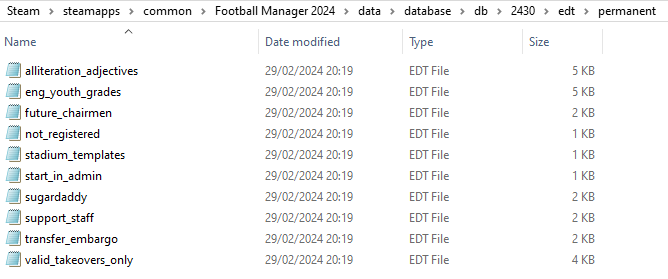
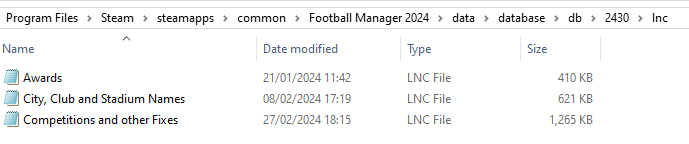
These are what the respective folder structures should look like in the 2430 folder:
dbc:

dbc/permanent:

edt/permanent:
lnc:
STEP 4:
COPY the 9 files located in the EDITOR DATA FILES folder in the downloaded pack
STEP 5
PASTE to \Documents\Sports Interactive\Football Manager 2024\editor data
This is also the same folder to be used for Gamepass.
Equivalent folder for Mac
Users/YOUR Mac USERNAME/Library/Application Support/Sports Interactive
By default this folder is hidden, so to access you need to do as follows:
Open Finder
Click ‘Go’ from the menubar
Press and hold down the ‘Option’ (Alt) key
This will bring up the ‘Library’, click to enter then go to ‘Application Support’ -> ‘Sports Interactive’ -> ‘Football Manager 2024’
Equivalent folder for Steam Deck
devices / home / deck / .local / share / Steam / steamapps / compatdata / 1904540 / pfx / drive_c / users / steamuser / My Documents / Sports Interactive / Football Manager 2024 / editor data
Equivalent folder for Epic Games
/Users / [your user] / Library / Sports Interactive / Football Manager 2024 / editor data
This should be what your editor data folder looks like now. There may initially be a config.xml file in this folder and it can be safely overwritten; it is generated by FM every time the game starts.
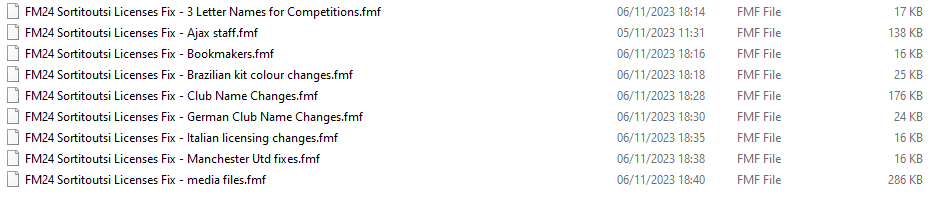
To make sure the files have been applied correctly, go to English Premier Division in your saved game, and it should be renamed to Premier League. If you are in the middle of a save-game when you install this download, German national teams will be populated in the next instance that players are called up, and not immediately.
Club names are only changed if you apply the editor data files before starting a new game. For a workaround if you've already started a new save-game, then please read the opening post of this thread.
The final version of this download for the default database can be downloaded from here.

- Date Created
- 19 Oct 2023 11:14:20
- Date Updated
- 23 May 2024 06:20:32
- Last Comment
- 27 Jun 2026 18:04:18
Comments
You'll need to Login to comment
cameosis
here's the screenshot:
the only uefa competition in german on the site
mons
I mean in the lnc file, not in-game. Looks fine in my lnc file, but it might have been something I've changed already, so I'm unsure whether it needs to be changed or not in my file.
cameosis
that i can't answer - had a disk crash and lost the game installation, and am on vacation.
was going by what's displayed on site (was comparing trophies, so the competition name was a by-product).
Peter Kalalalala
Hey guys, i have an question: Do this patches fixes the germany international squad?
mons
Yes.
Peter Kalalalala
Then I think I have overlooked something in the readme. How can I fix this for savegames as well? So not the names, but that “real” players are called up for Germany?
mons
Make sure you follow the installation instructions to install the files properly. If you think you have, please provided screenshots of your lnc folders, so I can confirm it is indeed the case.
Also, If you are in the middle of a save-game when you install this download, German national teams will be populated in the next instance that players are called up, and not immediately.
Peter Kalalalala
Ah okay. Then i will wait till next interational break 🙂
mons
Assuming you're on Gamepass, folder structure looks fine, so it's just a question of waiting till the next call-ups then.
kmalove
Hello please can I use FM24 - Competitions True Color Fix with fm24 sortitoutsi licenses fix Brazilian kit color change?
mons
No idea, the former is not my file so I can't tell. Why not try, and see how it goes?
jimsky
I did everything according to the instruction, the real names players have been updated but not the real names of the clubs (ie there is Man Utd instead of Manchester United). How to solve this issue? I have FM24 on Epic
Edit: Everything works fine now:-)
cameosis
"COMP_LONG_NAME_CHANGE" 92030194 "Franz-Beckenbauer-Supercup" ""
majaman
"STADIUM_NAME_CHANGE" 5647951 "Stadion Arnošta Košťála" ""
Pardubice stadium name change
PATAVIUM
Hello everyone, I don't know if it has been written already...Brescia Calcio club is bankrupt and no longer exists. Feralpisalò club is now called Union Brescia and plays in Serie C girone A. In replace of Brescia Calcio, in Serie C, Internazionale Fc under 23 has been included.
mons
We'll worry about teams in FM26 when it's released 😉
majaman
"STADIUM_NAME_CHANGE" 136192 "ShipEx Aréna" ""
Bh4Aes
Hello, I am a professional football player. Could you add me to the game?
mons
This has got nothing at all to do with this file. The FM data is owned by SI - you should speak directly to them 👍
cameosis
"COMP_LONG_NAME_CHANGE" 2000227159 "Ykkösliigacup" ""
mons
Should I change the short name too, or leave it as Ykkös Cup?
cameosis
should be changed as well, forgot to mention it - reason: the old name (ykköscup) was used when ykkönen was the second tier.
now ykkösliiga is the new second tier, and both versions (long and short) should be amended. it’s also official practice to call it ykkösliigacup, i checked.
change is also reflected in the logos for the competition (but written in one word, unlike in the logo):
https://sortitoutsi.net/graphics/browse/3/1449624/timeline
to be honest, i don’t know why they call both the second and the third tier »one / first«, which is what »ykkönen / ykkös« means …
mons
Got that for 2000227159 🍻
Are you saying that the below change should be done too, then?
cameosis
no, it stays as ykkönen.
they didn’t rename it, they just »demoted« it to tier three and inserted ykkösliiga (2000228209) inbetween, which is now tier two below veikkausliiga (129120).
however, i found this instead:
"COMP_LONG_NAME_CHANGE" 2000228209 "Ykkösliiga" ""
"COMP_SHORT_NAME_CHANGE" 2000228209 "Ykkösliiga" ""
"COMP_LONG_NAME_CHANGE" 129119 "Suomen Cup" ""
"COMP_SHORT_NAME_CHANGE" 129119 "Suomen Cup" ""
"COMP_LONG_NAME_CHANGE" 223599 "Suomen Cup (Ykkösen karsinnan)" ""
"COMP_SHORT_NAME_CHANGE" 223599 "Suomen Cup (Ykkösen karsinnan)" ""
"COMP_LONG_NAME_CHANGE" 223598 "Suomen Cup (Ykkösliigan karsinnan)" ""
"COMP_SHORT_NAME_CHANGE" 223598 "Suomen Cup (Ykkösliigan karsinnan)" ""
"COMP_LONG_NAME_CHANGE" 129123 "Suomen alemmat sarjat" ""
"COMP_SHORT_NAME_CHANGE" 129123 "Alemmat sarjat" ""
cameosis
"COMP_LONG_NAME_CHANGE" 24000276 "ŽNL Dubrovačko-neretvanska" ""
"COMP_LONG_NAME_CHANGE" 24000275 "ŽNL Istarska" ""
"COMP_LONG_NAME_CHANGE" 24000256 "Četvrta hrvatska nogometna liga - Središte A" ""
"COMP_LONG_NAME_CHANGE" 24000257 "Četvrta hrvatska nogometna liga - Sjever B" ""
mons
The first 2 seem already to be in my file - but I might have already changed them at some point from the original file.
Do you know what the short names for the last 2 would be please?
cameosis
if they're included, just ignore.
i won't reinstall any time soon, because my data recovery of all the graphic files is prioritized and will take a long time - meaning all my updates are based on the listings of the site here and fmref, so could very well be outdated, but it is what it is.
i can give you abbreviations for the regional leagues too if you want, once i'm home.
"COMP_SHORT_NAME_CHANGE" 24000256 "4. HNL Sr. A" ""
"COMP_SHORT_NAME_CHANGE" 24000257 "4. HNL Sj. B" ""
mons
Thanks for these - all added.
Not sure what you mean by abbreviations? Do you mean the 3/6 letters?
cameosis
short names for the competitions basically, if you want to add them - like the two above for the old 4th tier league.
mons
Ah yes, sure. Feel free to put here anything you want to be changed 🙂