FMV Logos Megapack
- 92,826
- 2026.08 - Released on 05 Jul 2026
Installation Instructions
Step 1) Where to put Football Manager Graphics
Once you've downloaded a Football Manager Graphic Pack and extracted it you should be left with a single folder on your computer. You're going to need to move that folder into a special location where Football Manager can find it.
Apple: Where to put the FM Graphic Packs on Mac
You will need to copy the folder to this location:
/Users/<yourname>/Library/Application Support/Sports Interactive/Football Manager 2022/graphics
You may find it difficult to find this exact location, to make it easier, use the following instructions:
a) Open Finder
b) Click “Go” from the menubar and select “Go to Folder” (alternatively press Shift+CMD+G)
c) Copy in the following: ~/Library/Application Support/Sports Interactive/
d) Open the “Football Manager 2022” folder
e) Open the “graphics” folder (or created it if it doesn't exist)
f) Move the downloaded files into the ”graphics" folder
Windows: Where to put the FM Graphic Packs on Windows
Simply move the folder to the following location:
Documents/Sports Interactive/Football Manager 2022/graphics
What if I don't have a graphics folder?
If you don't have a “graphics” folder simply create it 🙂
What if the downloaded files ends with .zip, .rar, .7z
If you have a file that ends in .zip, .rar or .7z then you'll need to extract the files before installing them. These files are called “archives” and are a way to compress a folder into a single file for downloading but you'll need to open them and get the folder that's in them before installing. DO NOT put these files in your graphics folder, it won't work.
Extract the files first and then put the extracted files into your graphics folder. If you're not sure how to extract them, look at these guides for windows or for mac.
What if the downloaded files are in parts e.g. “part01.rar”, “part02.rar” etc
If you have downloaded a pack in multiple parts ending in “part01.rar”, “part02.rar” etc then you do not have to extract them all individually. Just extract “part01.rar” and the rest should all be extracted automatically.
Step 2) How to refresh graphics in Football Manager
Unfortunately even though you have the folder in the right place Football Manager won't automatically pick up the new files. You're going to have to go in and tell Football Manager to reload your graphics.
Simply follow these instructions:
a) Open Football Manager
b) Click Preferences on the start screen (or if you're already in a game FM Logo > Preferences)
c) Click the “Advanced” tab
d) On the right hand side select “interface”
e) Scroll down the Skin Heading
f) Uncheck “Use caching to decrease page loading times”
g) Tick “Reload skin when confirming changes to preferences”
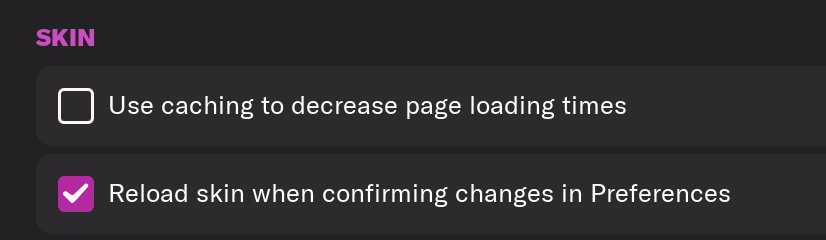
h) Click “Reload Skin”
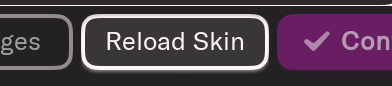
And now your graphics should be appearing.
You should go back into the preferences and follow the same steps but this time tick “Use caching to decrease page loading times”, this will help with the long term performance of the game, but needed to be unticked to install these graphics.
You'll need to Login to comment
Derek
Please use the link below to the latest megapack.
https://footballmanagergraphics.com/files/file/680-fmv-logos-megapack/
IgorTMT
@Derek the fmv mediafire link is going to download fmg vapour, fix pls
Derek
@IgorTMT Thanks for letting me know. All fixed now.
LetterBvB
Hey Derek
What is the number on CF Montreal's badge?
Derek
Hi, it's 2000152066.
IgorTMT
blubear
Hi can u make this logo for Barracuda in Togo please? ID 12095344
David Shaw
Hi guys is there a quick way of updating the pack please without having to go into each folder and copy and pasting each logo etc
Thomas-PSG
Hello.
Does it include the Women's game?
Thank you very much.
Footygamer
@Thomas-PSG not yet we're still gathering IDs
Tenta Plays
hi guys, I have issues with some club logos, like Real Madrid and Betis, on fm26, I still don t have the logos, and much more, from serie A as well, is there a fix?
Thomas-PSG
Thank you!
I don't get why they couldn't make them under the same IDs, would have been way simpler.
Tactriq
I got some issues with Real Madrid as well, the logo applies for Real Madrid B and the womens team but not Real Madrid mens team.
stefano buizza
A me non legge i loghi di Napoli, Como, Lazio, Atalanta, ecc..
Si può risolvere? Mi pare che il problema sia sorto dopo aver scaricato il facepack ..
Grazie mille,
MASTER
same here, anyone managed to fix?
Tactriq
I found a solution myself, but it is a bit annoying. It worked by adding a ! infront of the Real Madrid logos in the folder and then changing it in the config file to the same. This somehow removes the bug. So for example !1736 etc, worked for Betis as well.
Derek
This pack and our other 8 styles are now fixed and available to download for FM26. It does require downloading the pack again.
FM24 versions are also available in the downloads area.
https://footballmanagergraphics.com/
BrunnoW
I've gone back to FM24 and I'm having problems with the logo pack, I presume I've installed them correctly as it half works, so when I start a new save on the left column only shows certain real logo (league table as well) and the rest are fake but on the right panel where it tells you more info about the club the logo is perfectly fine, how do I fix this?
Ive tried clear cache, unticking using cache to… and reloading skins still nothing. Appreciate the help
Footygamer
@BrunnoW small logos were removed because they don't work in FM26 but we are adding them back now.
Derek
If you download from the link I provided you will not have any issues.
stefano buizza
Ciao, grazie mille per le risposte… Io però continuo ad avere problemi… Ho riscaricato nuovamente FMV Logos, ma continuo a non vedere parecchi loghi, come ad esempio in serie A ( Napoli, Lazio, Atalanta, Cremonese, Como)
stefano buizza
Ciao, grazie mille per le risposte… Io però continuo ad avere problemi… Ho riscaricato nuovamente FMV Logos, ma continuo a non vedere parecchi loghi, come ad esempio in serie A ( Napoli, Lazio, Atalanta, Cremonese, Como)
Derek
All working fine mate but you will need to download from FMG for the moment while the guys update the files here. It's very busy!
If anyone downloaded before November 2nd they will need to download this file and all logos will work fine with FM26. This file replaces the previous megapack which should be deleted.
https://footballmanagergraphics.com/files/file/951-fmv-logos-megapack-202600/
LoneIbex
Loads of club logos in Spain and Italy still aren't showing. Same for the Serie A logo.
Tactriq
Read the post above you, it's not updated here yet. Hopefully it will update here soon.
Tombrennan028462
Do i drag the entire "FMV Logos 2026.00" into my graphics folder?
When i click into “Clubs” within the folder there are Fantasy, Normal and Retro versions of logos?
Cheers.
jiNZ1337
I downloaded the pack from https://footballmanagergraphics.com/files/file/948-fmg-standard-logos-megapack-202600/ but I'm still missing logos like Lazio or Atalanta. Can anybody help?
Tombrennan028462
Read above comments -
"All working fine mate but you will need to download from FMG for the moment while the guys update the files here. It's very busy!
If anyone downloaded before November 2nd they will need to download this file and all logos will work fine with FM26. This file replaces the previous megapack which should be deleted."
jiNZ1337
Thanks mate, but as I mentioned I did download it from FMG and I did that just 2 hours ago.
Derek
That's the standard pack mate, this is a thread for FMV logos. Either way the pack still works and all available logos display.
I've just downloaded the pack to check from the screenshots and both logos are there.