a) when you have a lot of images to upload, then you should upload them as a pack instead of individually and save the both of us some time.
You can also upload up to 50 images per pack instead of just a maximum of 5 when done individually.
b) we want the player's face to fill the canvas for the 250px cutout, which would mean cropping the image along these red lines:
At the same time, we want all cuts to include a little bit of collar. Since in some sources like this one, the person in the image may have a longer neck than usual, this would be quite difficult to achieve naturally.
Here's a video of the process on how to nudge the collar upwards:
c) I appreciate the enthusiasm, but you're still starting out in cutting - so for the time being, I suggest you look in the tutorial and guidelines thread, upload a cut and its source in there and wait for our feedback. This way you'll be aware of what you need to do to improve and avoid having multiple cuts with the same issues 👍
a) when you have a lot of images to upload, then you should upload them as a pack instead of individually and save the both of us some time.
You can also upload up to 50 images per pack instead of just a maximum of 5 when done individually.
b) we want the player's face to fill the canvas for the 250px cutout, which would mean cropping the image along these red lines:
At the same time, we want all cuts to include a little bit of collar. Since in some sources like this one, the person in the image may have a longer neck than usual, this would be quite difficult to achieve naturally.
Here's a video of the process on how to nudge the collar upwards:
c) I appreciate the enthusiasm, but you're still starting out in cutting - so for the time being, I suggest you look in the tutorial and guidelines thread, upload a cut and its source in there and wait for our feedback. This way you'll be aware of what you need to do to improve and avoid having multiple cuts with the same issues 👍

 Background and Stadium Packs


@LafLaMeXV, a few things to keep in mind:
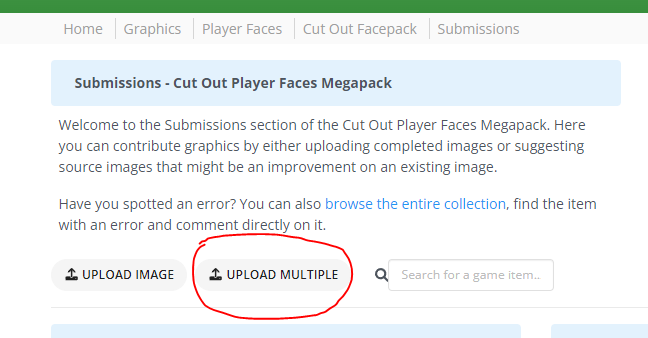
a) when you have a lot of images to upload, then you should upload them as a pack instead of individually and save the both of us some time.
You can also upload up to 50 images per pack instead of just a maximum of 5 when done individually.
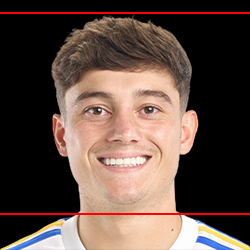
b) we want the player's face to fill the canvas for the 250px cutout, which would mean cropping the image along these red lines:
At the same time, we want all cuts to include a little bit of collar. Since in some sources like this one, the person in the image may have a longer neck than usual, this would be quite difficult to achieve naturally.
Here's a video of the process on how to nudge the collar upwards:
c) I appreciate the enthusiasm, but you're still starting out in cutting - so for the time being, I suggest you look in the tutorial and guidelines thread, upload a cut and its source in there and wait for our feedback. This way you'll be aware of what you need to do to improve and avoid having multiple cuts with the same issues 👍