@tanahashi35, we want the player's face to fill the canvas for the 250px cutout, which would mean cropping the image along these red lines:
At the same time, we want all cuts to include a little bit of collar. Since in some sources like this one, the person in the image may have a longer neck than usual, this would be quite difficult to achieve naturally.
Here's a video of the process on how to nudge the collar upwards:
@tanahashi35, we want the player's face to fill the canvas for the 250px cutout, which would mean cropping the image along these red lines:
At the same time, we want all cuts to include a little bit of collar. Since in some sources like this one, the person in the image may have a longer neck than usual, this would be quite difficult to achieve naturally.
Here's a video of the process on how to nudge the collar upwards:
Sounds good, I can re-do them with collars added. For players with high hair like this do you just want it to be cut off with the face the same size as if they had short hair? (Ignore the misaligned collar)
Sounds good, I can re-do them with collars added. For players with high hair like this do you just want it to be cut off with the face the same size as if they had short hair?
No need, several have already been cut so these aren't worth doing again tbh, and I'll fix the rest.
When it comes to big hair, the general indication is to include as much of it as possible, so you should include the big hair in the cut. i.e. the current cut is fine in that regard.
Also, I'm just now checking some of the cuts and they have a fair bit of snow, such as this one:
Snow is the colour from the background of the cut which was not totally removed. It is often white (hence ‘snow’) but it can be other colours. It can often be easily removed by putting the cut through remove.bg.
Here's a video on how you can easily remove any remaining snow thereafter within Photoshop:
I'll fix them myself too, but please keep this in mind for future cuts 👍

 Background and Stadium Packs



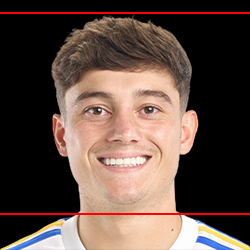


@tanahashi35, we want the player's face to fill the canvas for the 250px cutout, which would mean cropping the image along these red lines:
At the same time, we want all cuts to include a little bit of collar. Since in some sources like this one, the person in the image may have a longer neck than usual, this would be quite difficult to achieve naturally.
Here's a video of the process on how to nudge the collar upwards: