FMV Logos Megapack
- 92,826
- 2026.08 - Released on 05 Jul 2026
Installation Instructions
Step 1) Where to put Football Manager Graphics
Once you've downloaded a Football Manager Graphic Pack and extracted it you should be left with a single folder on your computer. You're going to need to move that folder into a special location where Football Manager can find it.
Apple: Where to put the FM Graphic Packs on Mac
You will need to copy the folder to this location:
/Users/<yourname>/Library/Application Support/Sports Interactive/Football Manager 2022/graphics
You may find it difficult to find this exact location, to make it easier, use the following instructions:
a) Open Finder
b) Click “Go” from the menubar and select “Go to Folder” (alternatively press Shift+CMD+G)
c) Copy in the following: ~/Library/Application Support/Sports Interactive/
d) Open the “Football Manager 2022” folder
e) Open the “graphics” folder (or created it if it doesn't exist)
f) Move the downloaded files into the ”graphics" folder
Windows: Where to put the FM Graphic Packs on Windows
Simply move the folder to the following location:
Documents/Sports Interactive/Football Manager 2022/graphics
What if I don't have a graphics folder?
If you don't have a “graphics” folder simply create it 🙂
What if the downloaded files ends with .zip, .rar, .7z
If you have a file that ends in .zip, .rar or .7z then you'll need to extract the files before installing them. These files are called “archives” and are a way to compress a folder into a single file for downloading but you'll need to open them and get the folder that's in them before installing. DO NOT put these files in your graphics folder, it won't work.
Extract the files first and then put the extracted files into your graphics folder. If you're not sure how to extract them, look at these guides for windows or for mac.
What if the downloaded files are in parts e.g. “part01.rar”, “part02.rar” etc
If you have downloaded a pack in multiple parts ending in “part01.rar”, “part02.rar” etc then you do not have to extract them all individually. Just extract “part01.rar” and the rest should all be extracted automatically.
Step 2) How to refresh graphics in Football Manager
Unfortunately even though you have the folder in the right place Football Manager won't automatically pick up the new files. You're going to have to go in and tell Football Manager to reload your graphics.
Simply follow these instructions:
a) Open Football Manager
b) Click Preferences on the start screen (or if you're already in a game FM Logo > Preferences)
c) Click the “Advanced” tab
d) On the right hand side select “interface”
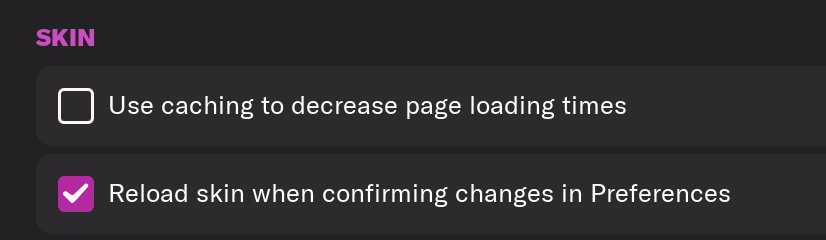
e) Scroll down the Skin Heading
f) Uncheck “Use caching to decrease page loading times”
g) Tick “Reload skin when confirming changes to preferences”
h) Click “Reload Skin”
And now your graphics should be appearing.
You should go back into the preferences and follow the same steps but this time tick “Use caching to decrease page loading times”, this will help with the long term performance of the game, but needed to be unticked to install these graphics.
You'll need to Login to comment
DP_Nuby
Is there womans teams logos? i downloaded the fmg pack and it didnt have them
Derek
The pack was released before ID’s for women’s clubs were known. Update 1 which is coming this weekend will include as many as possible.
jiNZ1337
Thanks for testing. Dont' know why it doesn't work for me. Shows everything but no Serie A, La Liga, Real Madrid, Real Betis, Atalanta, Lazio, Sevilla, Como, Cremonese, Napoli and maybe some others - even after deleting the whole folder and copy/paste it again. Maybe I have to live with that.
Edit: WORKED NOW! I downloaded it again with the mediafire link. First download was the mega.nz-link. Maybe you did not update that link with the updated version 🙂
Derek
That’s the one I downloaded mate 😁 The important thing is it’s working for you now 👍
Thomas-PSG
Can't create an account on the website as the security check does not display at all.
Need help, thanks!
Derek
Can you please send me an image by private message with the required information filled in so I can see the issue? I can then fix it for you.
baardhimself
I'm trying to use this on FM 2024 and for some reason even though all of the logos work and look great on the team pages, the Premier league ‘small’ logos don't work at all. I don't know how to fix it, it seems to work for all other leagues that I can see.
edit no matter what I did it wouldn't work, so I downloaded the TCM24 megapack and just used the small logos folder from there
jorgeismaels3
Hello, some logos doesn't appear while others do on the game, why is that??
Redhawk
Hello, there are several logos not syncing correctly. For example Real Madrid Men's doesn't but Castille and Women's does. Swedish leagues don't sync, changes in IDs perhaps?
Derek
It’s been posted many times at this point throughout the forum that small logos are not used in FM26. We provide both FM24 and FM26 megapacks on FMG for that reason as including them causes issues. Download the FM24 packs from FMG and they work on FM24. Download the FM26 packs from FMG and they work on FM26. If you u mix them in any way you will have issues with them displaying.
Derek
You need to download from FMG directly as posted previously. The packs here have not been updated.
Derek
Same as the above.
Footygamer
They have been updated now 🙂
Derek
Perfect thanks mate
baardhimself
That makes sense! But if you click on the FM24 Downloads on the left sidebar and then click on FM24 Graphic Megapacks it takes you to the FM 26 megapacks with zero mention or even implication that there will be a problem on 24. Seems like it's a website problem with the links not going to the right place!
Derek
Sorry mate I should have been clearer. I had previously posted that the packs here had not been updated (at the time of posting) and I had asked members here to temporarily download from my own site where we create the packs.
I had outlined there and in another thread here the issues. See links below.
FM24 FMV Logos - Not compatible with FM26
https://footballmanagergraphics.com/files/file/981-fm24-fmv-logos-202600/
FM26 FMV Logos - Not compatible with FM24
https://footballmanagergraphics.com/files/file/951-fmv-logos-megapack-202600/
The reason for this is FM26 does not require the small logos and causes issues when they are present while FM24 requires them.
Abdullah Alsaleh
Getting the error message “ERROR for site owner: Invalid site key” when trying to sign up at: https://footballmanagergraphics.com/
Derek
Should be fine now. I was just tweeking security settings. Thanks
Mike Coll
I've followed all instructions but still some clubs - R Madrid, Napoli etc that seem common to be missing - are well missing.
What is the fix for this please? I've downloaded the update etc yet still no luck.
All other graphics are working.
Derek
Please download from FMG and it will work fine.
fasola
@Derek Could I get the PSD file to make the crests in this style on my own?
IgorTMT
In previous updates, I simply copied everything from the new version and pasted it into the previous folder. This time, I noticed that the logos come with an extension like XXXX_club or XXXX_comp. Is this correct? Or can each update be in a separate folder? Won't this cause problems, such as the Italian Serie A logo not loading because the game now only reads one ID?