Not bad @paya. A couple of things to keep in mind:
a) For future cuts, keep in mind that the face should be straight-on, rather than slanting or at angle; i.e. the eyes are ideally in a straight line and parallel to the top or bottom of the cut.
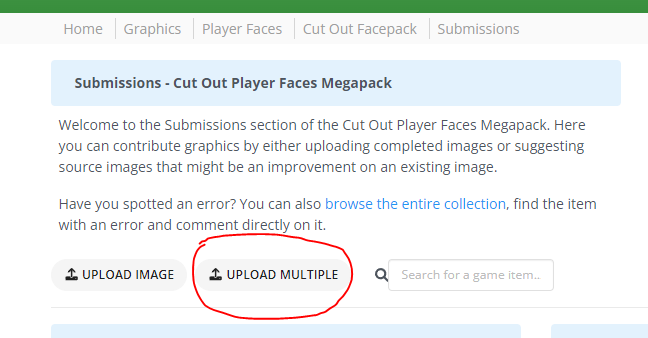
b) when you have a lot of images to upload, then you should upload them as a pack instead of individually and save the both of us some time.
You can also upload up to 50 images per pack instead of just a maximum of 3 when done individually.
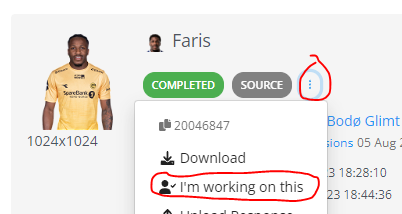
c) Best to mark images that you're working on, to make sure no one else takes them on at the same time without knowing they've been cut already?
Not bad @paya. A couple of things to keep in mind:
a) For future cuts, keep in mind that the face should be straight-on, rather than slanting or at angle; i.e. the eyes are ideally in a straight line and parallel to the top or bottom of the cut.
b) when you have a lot of images to upload, then you should upload them as a pack instead of individually and save the both of us some time.
You can also upload up to 50 images per pack instead of just a maximum of 3 when done individually.
c) Best to mark images that you're working on, to make sure no one else takes them on at the same time without knowing they've been cut already?
Noted 😊👍
(quick question about uploading cutouts in packs, where can I find the UID of created players?)

 Background and Stadium Packs




Not bad @paya. A couple of things to keep in mind:
a) For future cuts, keep in mind that the face should be straight-on, rather than slanting or at angle; i.e. the eyes are ideally in a straight line and parallel to the top or bottom of the cut.
b) when you have a lot of images to upload, then you should upload them as a pack instead of individually and save the both of us some time.
You can also upload up to 50 images per pack instead of just a maximum of 3 when done individually.
c) Best to mark images that you're working on, to make sure no one else takes them on at the same time without knowing they've been cut already?