Want to write for our blog? Get in touch about becoming a sortitoutsi writer.
Football Manager 2023 BETA is out and the full release is just around the corner. This means you're going to want to get all your graphics ready for the new game.
But what if you still have a save going on FM22 or another version of FM? Fortunately our graphic megapacks are compatible with every version of FM, but they also take up alot of space and having the same files twice in two separate places is a waste of valuable disk space.
Fortunately there's a solution using something called symlinks (or "symbolic links"). This will let you have your facepack, logopack, background pack or kitpack on your hard drive just once but reusable with every version of FM you have installed.
This guide assumes that you have graphics in the “Football Manager 2022” folder and want to also use them with “Football Manager 2023”.
For the purposes of this guide we will assume that you have a folder called “faces” in your graphics folder and that your graphics currently live in the “Football Manager 2022” directory and you want to use them with “Football Manager 2023”.
You will likely have folders with different names depending on how you setup your graphics folder.
You will need to replace the word “faces” for your own folder name you want to link and the years 2023 and 2022 if you’re trying to get this to work with other games.
You will need to link these individual folders and not the “graphics” folder itself. This is because some graphics, such as skins, cannot be reused between different FMs.
We have instructions for both Windows and Mac below:
Windows Instructions
Go to Search and type Command Prompt and open the Command Prompt app.
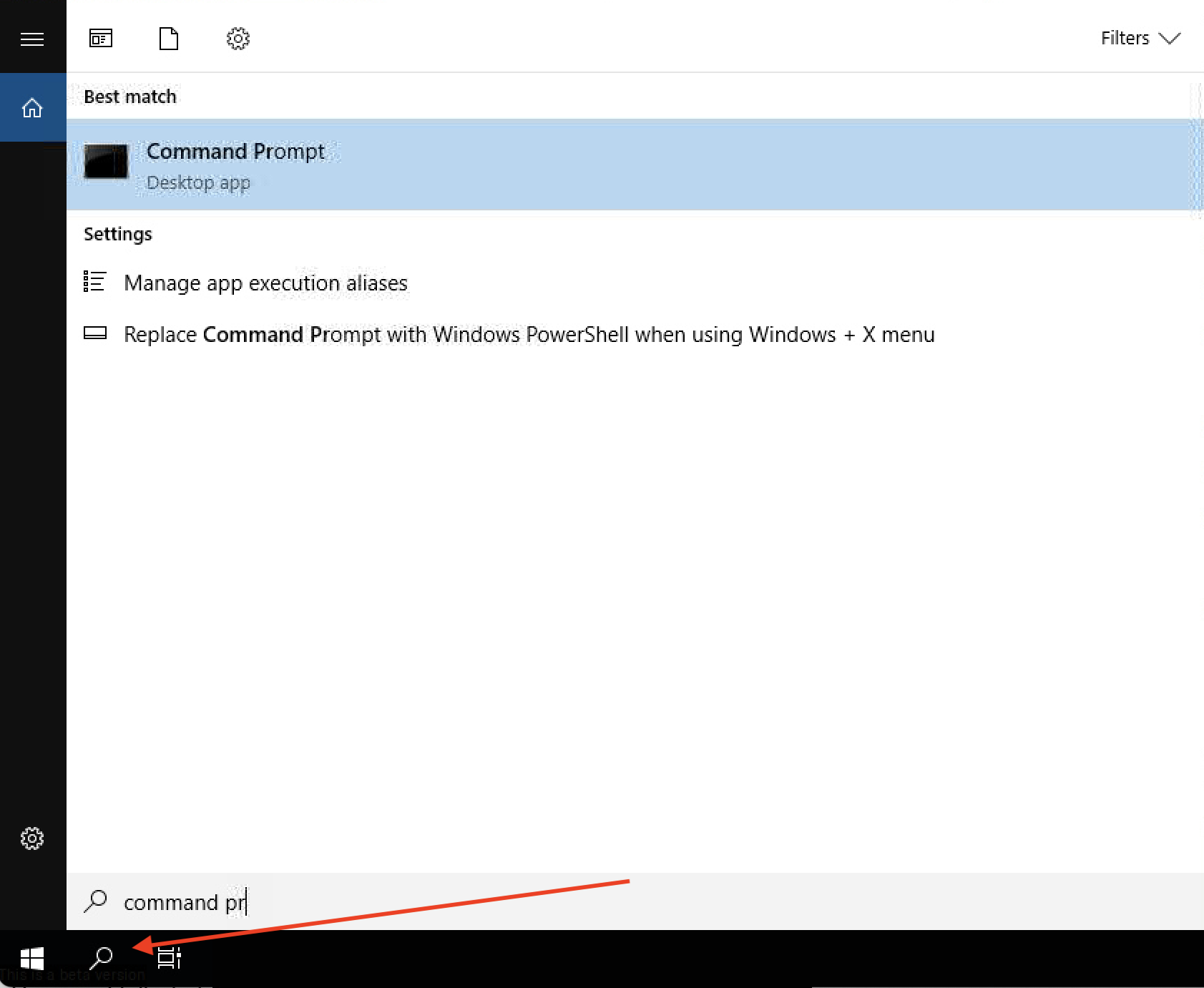
Then paste in the following and hit enter:
mkdir "%HOMEDRIVE%/%HOMEPATH%/Documents/Sports Interactive/Football Manager 2023/graphics"
This will create a graphics folder if you don’t already have one.
Don't worry if you see an error message about the folder already existing. It's quite possible you already have a graphics folder.
Then paste in the following:
mklink /J "%HOMEDRIVE%/%HOMEPATH%/Documents/Sports Interactive/Football Manager 2023/graphics/faces" “%HOMEDRIVE%/%HOMEPATH%/Documents/Sports Interactive/Football Manager 2022/graphics/faces"
REMEMBER: Change the “faces” folder to whatever folder you want to link and 2023 and 2022 to whatever games you want to link. Here we are linking FM22 faces to FM23.
You should see a success message saying “Junction Created”.

Now if you check your “Documents/Sports Interactive/Football Manager 2023/graphics” folder you should see a “faces” folder that’s identical to the “faces” folder for “Football Manager 2022” if you add anything to either folder it will be available in both the 2022 and 2023 folders.
On the 2023 folder the fact that it’s a symbolic link is shown on windows explorer using a little arrow icon:

If you ever want to remove the symbolic link put the following into command prompt, again assuming that you have a folder called “faces”
rmdir "%HOMEDRIVE%/%HOMEPATH%/Documents/Sports Interactive/Football Manager 2023/graphics/faces/"
Remember: do not try and link skins between different FMs as they will not work and may break things. Only link faces, logos, kits and backgrounds.
Mac Instructions
To create symbolic links on Mac press Cmd + Space to open the search and type “Console”

Then type
mkdir ~/"Library/Application Support/Sports Interactive/Football Manager 2023/graphics"
This will create a graphics folder if you don’t already have one.
Don't worry if you see an error message about the folder already existing. It's quite possible you already have a graphics folder.
Then paste in the following:
ln -s ~/"Library/Application Support/Sports Interactive/Football Manager 2022/graphics/faces" ~/"Library/Application Support/Sports Interactive/Football Manager 2023/graphics/faces"
To create a symbolic link to your faces directory.
REMEMBER: Change the “faces” folder to whatever folder you want to link and 2023 and 2022 to whatever games you want to link. Here we are linking FM22 faces to FM23.
You will not see any sort of success message, but you can check it works by typing in:
ls -lh ~/"Library/Application Support/Sports Interactive/Football Manager 2023/graphics"
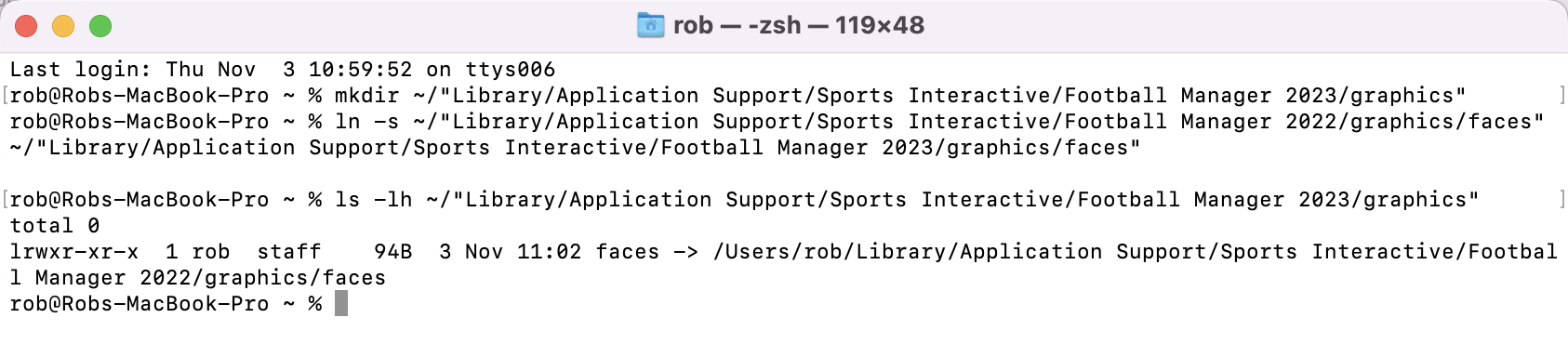
If you check your “Football Manager 2023/graphics” folder in Finder you should see a “faces” folder that’s identical to the “faces” folder for “Football Manager 2022” if you add anything to either folder it will be available in both the 2022 and 2023 folders.
If you’re not sure how to find your graphics folder simply open Finder > Go > Go To Folder and paste the following:
~/Library/Application Support/Sports Interactive/Football Manager 2023
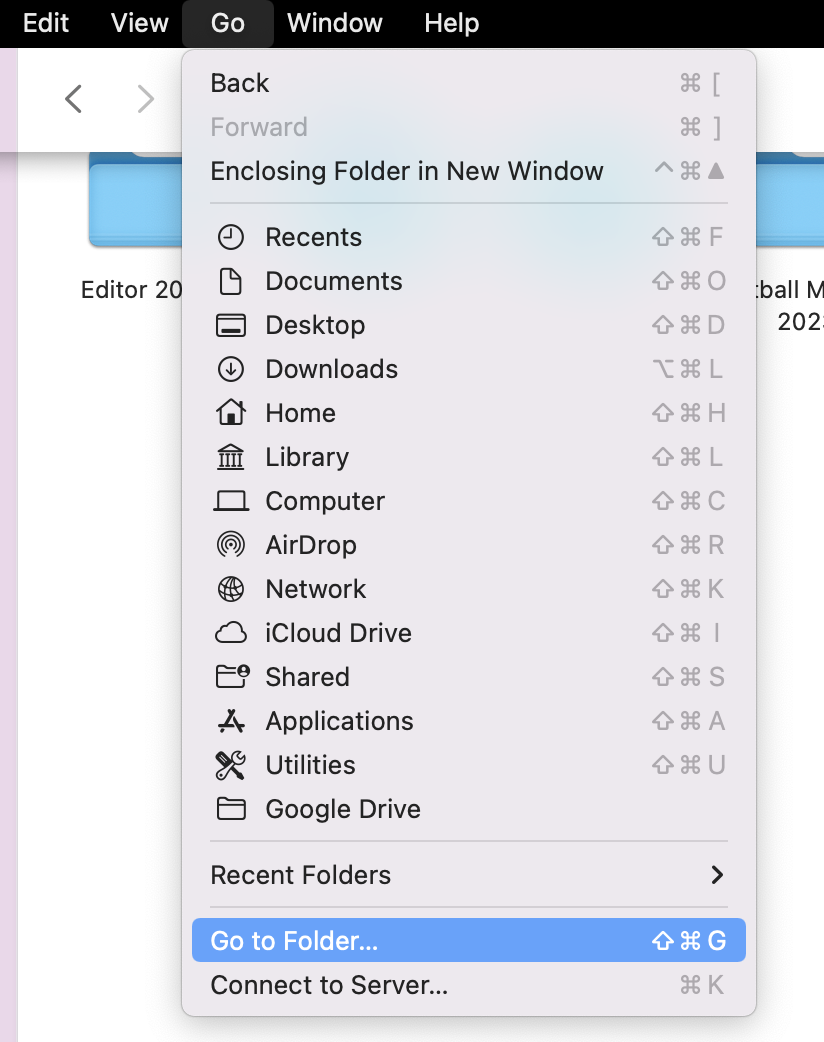
To make things easier in future I recommend just favouring the “Sports Interactive” directory by dragging it over to the favourites section in the sidebar.
If at a later date you want to remove this symbolic link simply open the console again and run his command:
rm ~"/Library/Application Support/Sports Interactive/Football Manager 2023/graphics/faces"
Remember: do not try and link skins between different FMs as they will not work and may break things. Only link faces, logos, kits and backgrounds.

- Date Created
- 03 Nov 2022 09:11:20
- Date Updated
- 03 Nov 2022 09:11:20
- Last Comment
- 06 Nov 2025 07:25:53
Comments
You'll need to Login to comment
phd_angel
Too complicated. Just copy paste the folders. Delete them in the older FM version to save space. Voil!
bartdude
Or cut and paste, as I do, then you've no need to delete.
The whole point of this post is to help people that play on multiple versions
johnloch
Damn true. It takes half day to copy and paste thousands of graphics. This method saves my life! A million thanks!
Don_Biglia
You can just link to the same folder in steam settings, configuring the options:
--user_data_location="your/dir/to/fm/folder"
Tarık Afacan
what if i delete all of the fm22 folders to save a space on mac, then fm23 graphics folder will be gone?
EndOfDaysX7
Is there anyway of linking FM21,FM22, FM23 all too one folder for graphics so they share the same graphics and folder instead of them having there own invididual folder…
Explained here
Joe Avalon
And if one has the folders “Football Manager 22” and “Football Manager 2023” on another drive different from the main drive C ? For instance, I have them both on the larger D drive.
trace
been looking fo this method for a few years, think i asked on Steam too. Too bad i found it after already copying the files. For FM21 i had to use the Steam game Properties (--user_data_location="your/dir/to/fm/folder") and configured both FM21 Touch and the full version to use the same user folders. this method tho will have all your save games in the same folder.
your method above may still come handy though since i am using Epic for this year's version and it seems with Epic you cannot modify "--user_data_location="your/dir/to/fm/folder"' as on Steam so i got one question, does this method still work if the graphics files have been compiled into a .fmf file?
Womaz
If we are buying FM23 and have no intention of playing FM22 again……I assume I just rename my folder Football Manager 22 to Football Manager 23?
jnrironside
Can you not just point them to the same user data folder? Unless you are playing multiple versions simultaneously;
ChrisMooUK
This method works perfectly for Mac. Although you have to go to Terminal, not Console.
NikDut
Or just rename 2022 to 2023
Footygamer
This doesn't help if you're using skins since skins are game specific.
tdurb0
1: Even though I can change the option somewhere so that 'Run as admin' was ticked Yes, it doesn't let me do so. So I don't even reach stage 1.
I've copied the whole graphics folder from C:Users/Blah/Blah manually from /Docs/SI/FM22 to the same except added FM23, but for some reason the skin showing in preferences only shows the default Football Manager skin. Kits, badges, cities, stadiums are all fine. Strange. I know I'm missing something simple, but I'm completely stumped. I've tried in FM23/skins and also FM23/graphics/skins, but still nothing.
mons
FM22 skins won't work in FM23.
tdurb0
Sorry, I meant to specify I'd deleted the FM22 ones, and add that I'd swapped my fantasy Derby kits from Champ to L1 inc configs.
What I'd forgotten to factor in is that I'm stupid.
I've been here since the ARSE command was a thing and yet manage to forget the basics each year.
Feel free to point, laugh, and make that noise people make when someone does something REALLY stupid.
Now I have FLUT dark appearing in preferences. Thank you though, I HAVE deleted the FM22 ones in case they were messing with it.
mons
No worries 🙂
Just to make you feel as old as me, there are users on this forum who weren't alive when the ARSE command was a thing.
#justsaying 👍
tdurb0
Thanks for that sly kick in the balls mate haha!! 🙂 Here's one for you then: (I've asked Miles and he doesn't know), when was the Addictedness Rating introduced? Sometime mid-to-late 90s is the closest I can narrow it down to, so CM something. Did you buy Championship Manager Italy, a completely standalone game? I KNOW I've still got it somewhere. Just so I could be Imola. Gathering dust with Radiohead cassette singles.
(Blue Monday by New Order was released closer to the end of WW2 than to today. 40 years old and still sounds like it could've been recorded yesterday. You're very welcome)
mons
Blue Monday is a fair bit before my balls dropped, so I wouldn't remember. My first game was CM3 and I don't think the addictedness rating was there. Iirc it was added in CM4.
tdurb0
See, you pretend to be old, but actually I’m genuinely ancient. Far too old to be spending evenings in front of FM23! But I’ve been hooked since the original Kevin Toms Football Manager which I think was a Commodore 64 game.
And anyway, that’s what divorces are for aren’t they? To re-prioritise time-management 😂
krashd
I do this but there are some caveats to it. At some point before FM21 graphics were stored in the %PUBLIC% folder rather than the %HOMESPACE% folder, and at some point before FM17 symlink support stops working. For example, for me to use the same graphics in FM14, FM17 and FM21 I need to do the following…
%PUBLIC%/Documents/Sports Interactive/Football Manager 2014/graphics <This is where the faces, logos, etc are installed>
%PUBLIC%/Documents/Sports Interactive/Football Manager 2017/graphics <This contains symlinks to the first directory>
%HOMESPACE%/Documents/Sports Interactive/Football Manager 2021/graphics <This also contains symlinks to the first directory>
I also have FM10 but I don't use graphics for him because faces from 21/22/23 just look weird in FM10 (18 year olds with 30 year old faces…)
DiuDiu
That's a really great guide, but these codes cannot run on my computer. When I change ‘faces’ to ‘logo’, which is the folder I wish to link, it says ‘system cannot find the path’. The current path is ‘C:\Users\79015\OneDrive\Documents\Sports Interactive\Football Manager 2022\graphics’ (I have no idea why it is in the OneDrive folder). Then I added ‘C:\Users\79015\OneDrive\’ before the ‘Documents’ in the codes, but this time it said ‘The file name, directory name, or volume label syntax is incorrect.’ (probably not exactly these words because my system is not in English).
DiuDiu
Ok I sort it out by myself. The code in the post is quite complicated. The simple one is:
mklink/d “target folder's path”“original folder's path”And just copy the path from File Explorer (or Manager, anyway, you know what I mean).
Plasticine
I did the syslink for mac, for each folder I wanted inside the Football Manger 2024/graphics.
When I go to the
~/Library/Application Support/Sports Interactive/Football Manager 2024/graphicsI can see all shortcuts that redirects to my external volume FM graphics folder:~/Library/Application Support/Sports Interactive/Football Manager 2024/graphicsIf I open the shortcuts they are all working, I can see the files and sub-folders inside them. So seems all is fine, but when I enter on FM 24 none of these graphics are loaded. I cleared cache, reloaded skin, started a new game, nothing works.
----------------------------------------------------------------------------------UPDATE-----------------------------------------------------------------------------------------
In another mac it worked, the difference is that the common folder was not in an external volume, but in the Documents folder. When reloading the skin, prompted me to have access to the Documents. Accepted. Then after reloading the graphics appeared as it should. Anyway, I have some problem in the other setup, but is not related with your guide steps, those are working fine.
Christopher Mark Cannell
does this work if i have the game and the sports interactive folder on an separate drive
I have my games all on say f drive not c and the sports interactive folder that normally sits in documents i have redirected via steam to sit on F drive as well
terryjbates
Theoretically, it should not matter if the folder is on a separate drive or in a different folder on the same logical drive. I have a suspcion of FM26 not respecting symlinks with regards to the graphics folder. I have all my graphics in my FM24 folder, so I made a symlink called “graphics” inside of the FM26 folder linking to graphics in my FM24 install, restarted, and saw nothing change.
When I hand created the “graphics” directory inside of FM26 and mimicked the facepack directory structure, including the config.xml and a few images, my faces began appearing. So, far as I can tell, the method of storing the images once in a dedicated location and then reusing them via symlink inside of FM26 directory does not work. Creating a “graphics” directory and then symlinking to faces directory does not work either. If anyone has discovered a workaround, please share. Apparently, the only solution is to just dump all the image files directly.
Christopher Mark Cannell
OK so unless they fix it I won't be doing fm26 unless I completely remove 24 as don't have enough space for two lots of packs. Also the steam command to put the sports interactive folder in different location not working either