FM05-24 Standard Kits Megapacks
Please take not that the files labeled 05-24 are not suitable for FM26 and beyond!
Our wfm18 x sortitoutsi.net Football Manager Standard Kits Megapack matches the same design as the default 2D kits in Football Manager but includes all the real kit designs that Football Manager doesn't come with by default!
- 1,798
- 2024.04 - Released on 06 Jan 2024
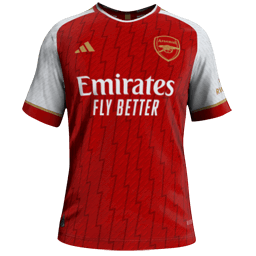
This file is old and may not be compatible with FM26 and later.
Antonio La Magna
in this standard kits there aren’t Serie A teams like Napoli, Monza. Lecce and third kit of Udinese,
wfm18
Waiting for 3D sources but they will be added over the course of the season; maybe @Humberto21 or @priority76 can help me out with these.
Dobsonov
Hi guys, thanks for everyone's hard work in making these kit packs.
I notice there are obviously loads more kits in the FM23 pack compared to the FM24 pack. Can I download both to get the most kits possible, or will this cause a conflict?
Thanks.
karrincha
Hello,
I don't understand, I installed the pack in the graphics folder, and I did what was necessary in the preferences, but the kits still don't appear?
Finally, I only have the liga and 1ere ligue jkits...
Can you help me? I've tried everything.
JamesF93
Hi guys,
Long time FM player, first time poster.
This is probably a dumb question but I haven't seen it asked in the forum, and the download instructions don't seem to specify.
When downloading the latest update file do I need to amalgamate it with the previous iteration? Or keep both in their respective folders?
Thanks v.much in advance for any help with this query.
Qvordrup
you can have all the versions 2022, 2023, and 2024 at once 👍 just take notice of the fact that the game reads the folder in alphabetical order so if you name the folders you have your kits in by year then it reads the 2022 folder first and show them in game before the 2023 and 2024 kits.
Qvordrup
My guess is that you just need to create a kits folder within your graphics folder and put all the kits and the config in there and then it should work.
FEDE VERDE
Hello, I did this and I am also still not getting it to work, I'm trying to get brazil kits. the directory that the kits are under is this C:\Users\USER\OneDrive\Documents\Sports Interactive\Football Manager 2024\graphics\kits\sortitoutsi Standard Kits Megapack 2024.03
I'm all out of ideas on what to do. Should I delete the megapack folder and just have the config and the graphics folder inside the kits folder?
Qvordrup
Just have this : C:\Users\USER\OneDrive\Documents\Sports Interactive\Football Manager 2024\graphics\kits (not two graphics folders that will absolutely not work)
Then put all the kits and the config in the kits folder 👍
Do you have other graphics that work, it might also be the onedrive thing that is causing the problem.
sonofameobi
Hi all, I was wondering if anyone can help me?
I have downloaded and extracted the standard kits megapack but it is not working. Currently I have kits for the English leagues and German leagues but none of the other major leagues (Italy, Spain, Portugal, Holland etc.). I have tried deleting it and redownloading/extracting, also tried the SS kits and had the same issue. Tried clearing the cache and reloading the skin multiple times.
I also have the logos and faces dowloaded and extracted within the same graphics folder and they are working fine so I can't figure out why it wont work! Any help would be greatly appreciated!
scottygdog98
I don't know if there already is one there that I can't see because I'm blind but is there a pack for Segunda División teams for the new season
Michael Unterberger
So please, please help me😉
My problem: it worked once and only with the home kit when reloading the skin. Then never again. Didn't change a thing in the config.
This seems illogical to me.
Thank you.
<record>
<boolean id="preload" value="false"/>
<boolean id="amap" value="false"/>
<list id="maps">
<record from="home" to="graphics/pictures/team/643/kits/home"/>
<record from="away" to="graphics/pictures/team/643/kits/away"/>
<record from="third" to="graphics/pictures/team/643/kits/third"/>
</list>
</record>
Jamaicaman90
Your filenames are not matched with your config file. The ‘record from="home"’ for example is looking for exactly what is in the speech marks, no more and no less. Rename the graphic files to ‘home’, ‘away’ and ‘third’ (so get rid of the number and underscore) and then reload skin with cache unticked and your problem should go away.
Michael Unterberger
My man! Thank you so much. Sry for being such a dummy.
Jamaicaman90
That's what a community is for, I've done my own fair share of troubleshooting over the years!
A tip for you. You're putting those kits directly into a ‘kits’ folder, which is fine. However, with your config files I would recommend you make a sub-folder per team if you aim to download/make more kits as you can't run multiple config files from the same folder. In short, if you decide to grab some kits for PSV, make an Ajax folder and a PSV folder within your ‘kits’ folder there and dump the relevant files in each one, making ‘kits’ only contain subfolders. The alternative is running one big config file which I personally do not recommend.
Joakimforsell
Im using FM Kit Creator to make the kits for the Swedish Allsvenskan. Im not able to find last years Adidas graphic for keepers, the tiro 24. Anyone who has an idea how to get it?
StuartNG
You can’t add goalkeeper kits ingame unfortunately. If you use the pre or post match editor, you can get it relatively close with a bit of tinkering. Shame really, as I think bespoke goalkeeper kits would be a decent addition.
kieran mowatt
this is happening for me as well its nippy (kits disappearing)
magnata 2022
Hello, everyone! I'm making a save with Millwall and I'd like to play with the updated kits (2D and 3D). I downloaded the pack from Sortitoutsi and did the usual procedure on FM (clearing the cache and restarting the skin). It's not working. The game only pulled some kits from the Premier League teams (Arsenal, Liverpool, City, Chelsea, for example) and not the others. In the second division, the teams have the kits that are already licensed in the game, as well as in the Bundesliga. Everything else worked out fine. I've redone the procedure a few times, looked for recent FM updates, and looked in the config folder and everything is there, but the game can't "recognize" it. Oh, and the colors and names are all fine too. Does anyone know how to solve this issue?
FMStrawzy
can you send a screenshot of your graphics folder in documents and the information in your config folder please
redblueeagle
Are standard kits still being worked on? I prefer them to the others tbh but there doesn't seem to be the support for them. The Crystal Palace kit is still last years in the 2024 megapack.
TipToppy
Does anyone else have the problem that for some teams, the new kits never show. I've tried deleting all old ones, looking for duplicates, separate folders etc and nothing works. Highly frustrating!
One team in particular I cannot change.
2000526956
Could anyone else try or have a solution?