DF11 Player Faces Megapack
- 255,647
- 2026.08 - Released on 16 Jun 2026
Installation Instructions
Step 1) Where to put Football Manager Graphics
Once you've downloaded a Football Manager Graphic Pack and extracted it you should be left with a single folder on your computer. You're going to need to move that folder into a special location where Football Manager can find it.
Apple: Where to put the FM Graphic Packs on Mac
You will need to copy the folder to this location:
/Users/<yourname>/Library/Application Support/Sports Interactive/Football Manager 2022/graphics
You may find it difficult to find this exact location, to make it easier, use the following instructions:
a) Open Finder
b) Click “Go” from the menubar and select “Go to Folder” (alternatively press Shift+CMD+G)
c) Copy in the following: ~/Library/Application Support/Sports Interactive/
d) Open the “Football Manager 2022” folder
e) Open the “graphics” folder (or created it if it doesn't exist)
f) Move the downloaded files into the ”graphics" folder
Windows: Where to put the FM Graphic Packs on Windows
Simply move the folder to the following location:
Documents/Sports Interactive/Football Manager 2022/graphics
What if I don't have a graphics folder?
If you don't have a “graphics” folder simply create it 🙂
What if the downloaded files ends with .zip, .rar, .7z
If you have a file that ends in .zip, .rar or .7z then you'll need to extract the files before installing them. These files are called “archives” and are a way to compress a folder into a single file for downloading but you'll need to open them and get the folder that's in them before installing. DO NOT put these files in your graphics folder, it won't work.
Extract the files first and then put the extracted files into your graphics folder. If you're not sure how to extract them, look at these guides for windows or for mac.
What if the downloaded files are in parts e.g. “part01.rar”, “part02.rar” etc
If you have downloaded a pack in multiple parts ending in “part01.rar”, “part02.rar” etc then you do not have to extract them all individually. Just extract “part01.rar” and the rest should all be extracted automatically.
Step 2) How to refresh graphics in Football Manager
Unfortunately even though you have the folder in the right place Football Manager won't automatically pick up the new files. You're going to have to go in and tell Football Manager to reload your graphics.
Simply follow these instructions:
a) Open Football Manager
b) Click Preferences on the start screen (or if you're already in a game FM Logo > Preferences)
c) Click the “Advanced” tab
d) On the right hand side select “interface”
e) Scroll down the Skin Heading
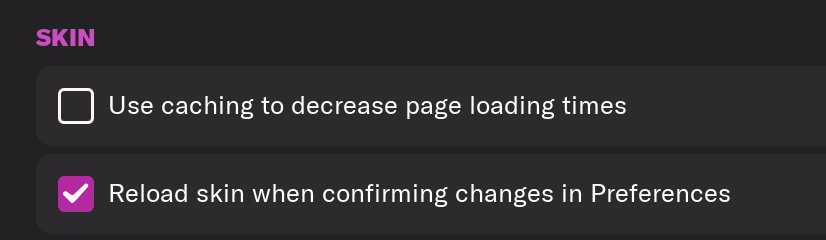
f) Uncheck “Use caching to decrease page loading times”
g) Tick “Reload skin when confirming changes to preferences”
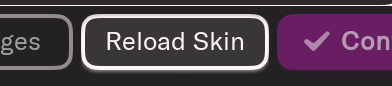
h) Click “Reload Skin”
And now your graphics should be appearing.
You should go back into the preferences and follow the same steps but this time tick “Use caching to decrease page loading times”, this will help with the long term performance of the game, but needed to be unticked to install these graphics.
You'll need to Login to comment
Danisurdo
Hello, I have a problem with my fm24, I use the DF11 Megapack face pack, I don't know why I have the latest update but many of the faces were not updated in the game, what I mean by this is that I have players in the game that come up with the old faces having the new image in the folder, the game takes the old image and not the updated one, I don't know if I can explain myself, excuse my English but I speak very little of it.
example in the first image I have the Djalo player with that image but in the faces folder I have the second image below…
Arturito91
Any one can send me Wojciech Szczęsny face ? 🙂
GeeSee
Trzymaj 🙂
mayday
Any one can send me Leo Coelho and Maximikiano Silvera(Penarol) and Juan Pablo Vigon (Tigres Unal) face . Thanks
ID 19274707
ID 78074444
ID 51013661
DaKingKerion
I think there Is a problem with Amine Gouiri's face in the pack because in the game it is showing Amine Harit.
Omed
cant find them for reetro 13-14 anymore 😢 i need them
TheWednesday
Not sure if it's something else I've got installed interfering with the ID, but this player looks to be missing a face within my current save - 2000165119 (Daniel Burubwa). If he is indeed missing, it'd be great if he could be added to an update pack.
Mr Eker
man utd - ugarte and dorgu.
JoãoCarvalho92
Someone have the face of andre silva from Penafiel ? Yes, Diogo jota brother's.
Mr Eker
Faisalx3
Get Saudi League players' face pictures from here
https://www.spl.com.sa/en/teams/3093/al-nassr/squad?compSeason=859
Stephen Coates
Hello all, Does anybody have link to both Diego Leon and Chino Obi for Man Utd using the DF11 face packs. Ive tried manually to put them in ( using my iMac ) but have no joy. Im a novice at this so would def appreciate any help.
Stephen Coates
Hello all, Does anybody have link to both Diego Leon and Chino Obi for Man Utd using the DF11 face packs. Ive tried manually to put them in ( using my iMac ) but have no joy. Im a novice at this so would def appreciate any help.
Robinzonik
guys i have a problem in fm 2026 when i download this facepack my many clubs logo for example real are now default why this happened? but when i delete this facepack the real logo come back what i need to do?
Jean-Michel Lahaut
Hi! I downloaded the megapack and put it in the right folder, but not showing in the game. Already tried to restart, relaunch steam, launch a new career, but still blocked with the basics faces on the game. Any idea to help me?
ForeverUnitedRI
Does this work with FM26?
If so, where do I move the folder please for Mac?
Thanks.
theterrier
I have looked in all packs and Mark Robins is still in his Coventry tracksuit, not Stoke City
LBOW6
Can anyone advise where I can send requests for future updates for this file?
Ttggfr
Hi,
As a part of the team I can tell you that you would have to download from df11 faces official website.
Update files are released on 1st each month for classic style (Cut with frame) and 10th each month for pure style ( No frame)
If you need something to discuss with the ‘boss’ of df11, you can dm me and I can give you the email address.
But if you are looking for a request part like this site does for cut-out megapack, unfortunately we do not take requests.