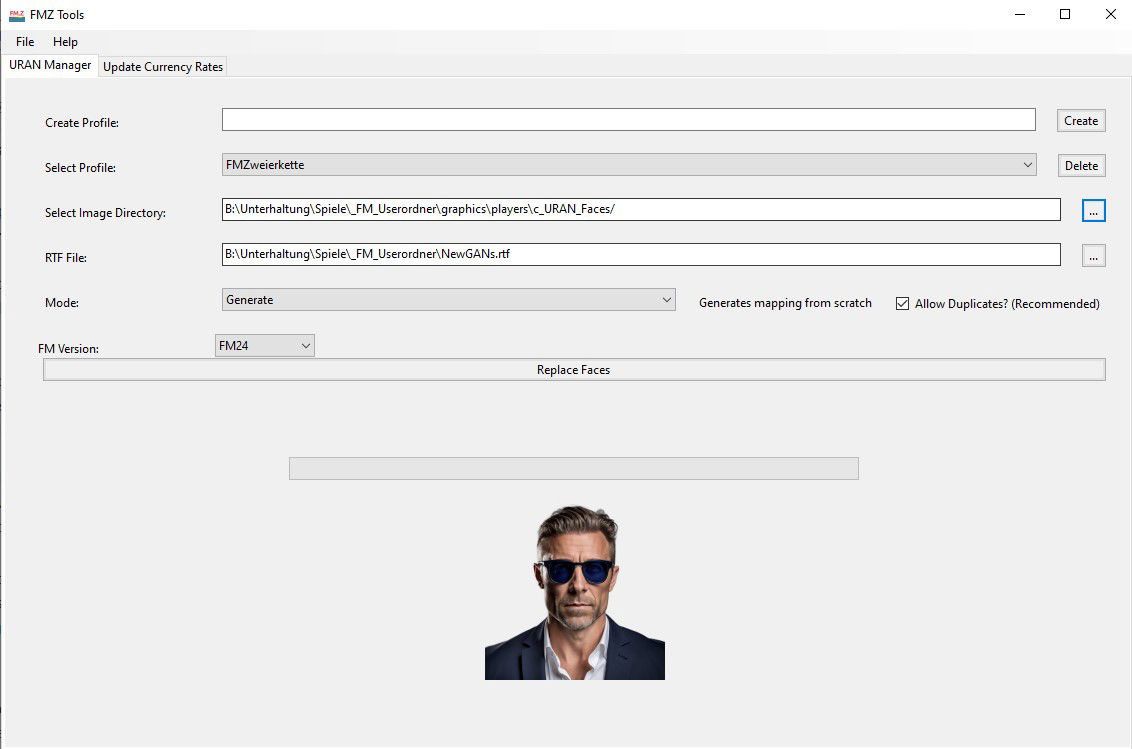
This is a replacement for the Newgan Faces Manager Tool. If you have previously used that tool and are using the same saved game you will have to continue using that tool. For new saves, please use this tool alongside the latest version of the Ultra Realistic NewGan Faces Megapack.
This tool will let you generate a config file for Newgan players that you can combine with a Newgan Players Facepack in order to have realistic photos for new players that the game generates.
When you download it you will be greeted by a .zip file. Follow the same steps as in Step (1) to unzip this file.
You will then want to download click on the following file:
Windows: NewGAN-Manager-Installer-Win/windows/NewGAN-Manager.msi
Mac: NewGAN-Manager-Installer-Mac/MacOS/NewGAN-Manager.dmg
This will then install the program on your computer.
You may receive an error on Mac
“NewGAN-Manager.app”cannot be opened because the developer cannot be verified.”
To get around this simply go to Library > Applications find NewGAN Manager and click Right Click > Open and then select “Open”
Download URAN Faces Images: https://sortitoutsi.net/graphics/style/33/ultra-realistic-newgan-faces-megapack
Full URAN Faces Install Guide: https://sortitoutsi.net/installation-instructions/7/how-to-download-and-install-realistic-regen-player-faces-newgan-faces-in-football-manager

- Date Created
- 09 Sep 2024 09:47:33
- Date Updated
- 09 Sep 2024 09:47:34
- Last Comment
- 31 Oct 2025 11:24:51
Comments
You'll need to Login to comment
kylemcguinness25
I have the same problem and it doesnt seem anyone has an answer.
The only thing you could do is download NewGAN-manager and use a smaller database.
https://fm.zweierkette.de/grafiken-mods/ultrarealistic-newgan-faces/
McGinniesta
Hi,
How did you fix this? I have deleted and recreated the RTF file about 5 times and each time I hit “Replace Faces” it still gets stuck on Map player to ethnicity.
I have done all the checks. I am using the correct view, clicking the correct filters and file path and all that stuff but it just will not get past Map player to ethnicity.
I am about 5 seasons in and have done this 2 or 3 times already in this save and never had any issues. Any help?
imambaiqagi
what is update currency rate in fm.z? how to use that?
Shannon21
Does anyone know how to solve this issue?
I am following all the steps. (I have managed to do this successfully for other saves.) But when I click ‘Replace Faces’ the button does not work.
Sundaebb
System Settings > Privacy & Security
Scroll to the bottom and there will be an option to allow the program to run.
krisrod85
Do we have a solution for Mac yet? Steps followed exactly, “Replace Faces” still does nothing.
Rivaz
Just decided I had to try this - but I must be doing something wrong. I have followed the tutorial to the letter and watched the video. So far so good. The Fm.z provides me with what looks like a perfect xml, with all neccessary IDs. I have run the program twice, one with a new manager and one with me as the manager, and I have used three different skins, including the original FM. In none of the cases do any of the newgen faces turn up. All the old gen faces have disapeared however, and do not even show a blank - just nothing. So something has been substituted, but not quite what I expected…….. Any ideas?
SteelCityCaesar
Is there a different filter I'm supposed to used on the staff search page? When I use ‘is newgen search’ I just get all the staff in my view (25,000+) including non-regens.
Raymond Yu
Hi, I cannot use this and my OS is windows
I have installed the software, but it seems not successfully. Here's the location where I have installed:
C:\Program Files\GameCrasher\FMZ Tools
gregthegreat
I'm having the same problem
Leroy Stardust
I have the same issue!