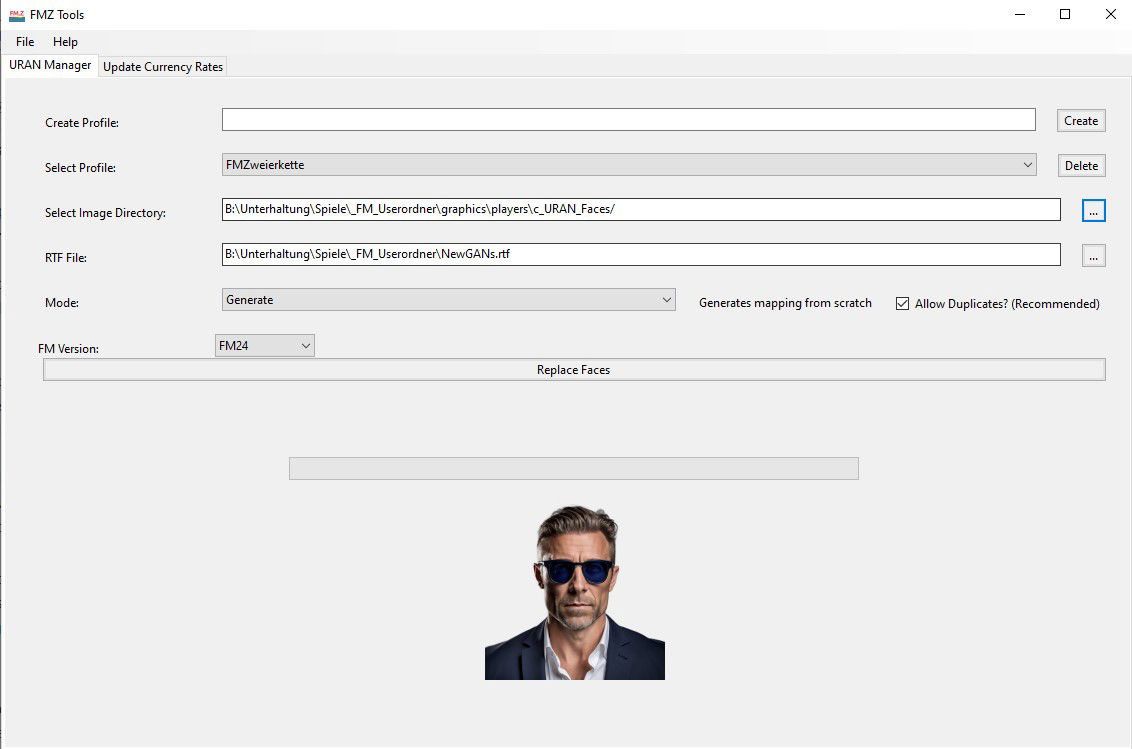
This is a replacement for the Newgan Faces Manager Tool. If you have previously used that tool and are using the same saved game you will have to continue using that tool. For new saves, please use this tool alongside the latest version of the Ultra Realistic NewGan Faces Megapack.
This tool will let you generate a config file for Newgan players that you can combine with a Newgan Players Facepack in order to have realistic photos for new players that the game generates.
When you download it you will be greeted by a .zip file. Follow the same steps as in Step (1) to unzip this file.
You will then want to download click on the following file:
Windows: NewGAN-Manager-Installer-Win/windows/NewGAN-Manager.msi
Mac: NewGAN-Manager-Installer-Mac/MacOS/NewGAN-Manager.dmg
This will then install the program on your computer.
You may receive an error on Mac
“NewGAN-Manager.app”cannot be opened because the developer cannot be verified.”
To get around this simply go to Library > Applications find NewGAN Manager and click Right Click > Open and then select “Open”
Download URAN Faces Images: https://sortitoutsi.net/graphics/style/33/ultra-realistic-newgan-faces-megapack
Full URAN Faces Install Guide: https://sortitoutsi.net/installation-instructions/7/how-to-download-and-install-realistic-regen-player-faces-newgan-faces-in-football-manager

- Date Created
- 09 Sep 2024 09:47:33
- Date Updated
- 09 Sep 2024 09:47:34
- Last Comment
- 31 Oct 2025 11:24:51
Comments
You'll need to Login to comment
Dancmartell
I had some issues with the FM.z only changing as few faces, i resolved this by reverting my skin to default and reselecting, exporting and running through FM.z all faces have changed now. Hope this helps someone took me hours of tinkering to work it out.
Dodo Lasaumure
What "players" folder? There's nothing of the sort in the folders, it's ordered by ethnicity
David Crossley
The replace faces button is not a folder, it is a button on programme itself.
T90
Still also cannot get this to work. Whenever I hit replace faces button, the app doesn't do anything. It doesn't free, it doesn't load, it acts as if I didn't hit any button. On a Mac, FM24.
Hendrawna2018
So when i put the filter in for the scouting section, im only getting 860 newgens and not the 14k?
Any ideas?
Ray Slavenburg
Mine won't work, lmao. newGAN worked like a gem beside FM24 itself effing it up, but when I press ‘Replace faces’, absolutely nothing happens. Tried administrator rights, didn't work. Using a correct RTF file, the correct image directory with the correct structure, on Win10. Anyone with a lightbulb moment?
FMM2107
I have the same problem. There are 25568 players in the list. I selected all of them and clicked on them again with the right mouse button to check: 25568 players here too.
If I now export to an RTF, FM24 only takes approx. 250 players into the file.
Even when printing to PDF or HTML only 250 players.
What is the reason for this?
Giorgio Gandolfi
wrong section… sorry
Lucas Paludo
Yeah, me too, I just could do the generate file one time, after i tried to replace and update the faces, the app never more worked. Neither the replace button and generate button… What could we do to have the Faces ?
Ross Balch
Is there some kind of override in FM? I have a “fake player” save, and after running this, a lot of players have been changed, but a bunch are still coming up with the NewGen faces, presumably the ones that are just real players with changed names?
edit - just to mention, I checked the XML file generated by the tool, and the players are there and assigned a new image, I basically just exported a list that is every player in the database, however despite being in the XML still the newgen faces persist.
Harry Castle
Downloaded everything but can't get the filters to load when on step five. Can't find a solution on Mac and even paid for the yearly subcription in order to download it properly (i'm the real loser). Any danger of some help or do i just have to hold this one?
jchiu093
can I use this tool for zealand's newgan face pack?
Zhaen
same, very frustrating
Peter Kalalalala
Mh i dont get it. Doing every step, tool said images were created but in game some faces are replaced und some not.
Anyone else this problem?
PoorJack
It's a simple step to check: Are the IDs of those players in the .rtf file you exported?
If the IDs aren't there, then obviously, no photo would be assigned to those players.
If this is the case, then the solution is straightforward: Include them in the list (or another list) in some ways and export again…
Jayfe
I can't even get the app to launch. Nothing happens when I click the exe once I've installed it. Any suggestions would be appreciated
PoorJack
These are about NewGan Manager, but may have a look:
https://www.reddit.com/r/TheOldZealand/comments/rnlmvy/newgan_manager_stopped_launching/
https://www.reddit.com/r/TheOldZealand/comments/159vxwf/newgan_manager_wont_load/
https://www.reddit.com/r/TheOldZealand/comments/v0wv0y/newganmanager_isnt_opening/
Peter Kalalalala
Mh okay, Seems like a lot of work 😀 The filter in the search should actually do this job or am i wrong?
PoorJack
In most tutorials, people suggest using a new and unemployed manager to find newgens and export the list. But the fact is that just not everyone are there on the list. The obvious example is the U18 squad of the team you're managing. From my experience, often only a few of my U18 new boys get their newgen photos.
So, what I do is: Do it twice… build a list using a new and unemployed manager, and then another list with myself (the manager I'm playing), mainly for my new youth intakes.
This way should cover more players… Is it going to cover every newgen in the game? I don't think so, but should be the best you can do. Of course, if you only need to add photos to a few players, then you may just manually edit the config.xml file.
Peter Kalalalala
Thanks for the hint! Works fine now.
PoorJack
The situation is that you're going to meet some players without photos anyway.
For example, I usually do the newgen photo assignment at the end of every season (English Premier League, i.e. June). But, the fact is that some countries have different youth intake dates, e.g. September or October in Argentina, Brazil, Sweden,…
That means you're going to encounter some newgen players with no photos in the game… until you run the tool next time.
Yes, you may do the photo assignment every month or every 3 months. Or, may just take it easy and enjoy the game.
Peter Kalalalala
I can enjoy the game without the NewGan faces, it was just my question why the tool / filter doesn't catch every player. So all good
PoorJack
“it was just my question why the tool / filter doesn't catch every player.”
I actually think it makes sense this way…
Yes, it's convenient if an unemployed manager knows every single player in the world. However, I can't imagine that he knows much about my U18 squad.
Those players just entered my team 2 months ago, and I can't even remember how many they're… yet this outsider knows all their names? It's just kind of unrealistic. Let alone the fact that I'm just managing a small club in a semi-professional league…
Anyway, some said that the in-game editor may help select all players. Not sure if it means the same thing as in a player search… may check it out, if you're interested. Cheers!
Peter Kalalalala
Trying to preserve images. Program stucked in “Map player to ethnicity”. Someone else?
Edit: Works now with new generated RTF file
SH Kerain
This button is not working. Do you know what's wrong?
PoorJack
Try to… select a profile first?
It may be a good time to review the steps first:
https://sortitoutsi.net/installation-instructions/8/how-to-download-and-install-uran-newgenregen-player-faces-using-use-fmz-tool-in-football-manager
https://www.youtube.com/watch?v=GksR7qbDVgQ
Peeking Duck?
So…this thing appears to not work at all for me. Anyone get it to do the thing?
PushUpzs
Hello everyone. When I run it, it is not picking up Japanese player as japanese and is giving them “european” faces. ANy idea on what to do?
PoorJack
For reference: https://www.youtube.com/watch?v=rpGpTIapPhs
luke160388
I can't open FMZ tool on my MacBook Air (Seqoia 15.3.2) get the “Apple count not verify that FMZ Tools is free of malware……. etc” message. Can't open with rosetta either still get the same message. Is anyone able to help? Thanks.